The best podcast analytics tools help you understand how many people your podcast reaches, which episodes perform best, where your audience comes from, and how listeners engage with your content.
For most podcasters, Spotify for Creators, Apple Podcasts Connect, and YouTube Studio are excellent places to start because they provide free insights into audience behavior on their respective platforms.
If you need analytics across multiple listening apps, Buzzsprout, Transistor, and Captivate offer more comprehensive podcast reporting as part of their hosting services. Podtrac is another useful option for independent podcast measurement.
But there’s an important detail: no single analytics tool gives you a complete picture of every listener across every podcast app.
Some platforms measure downloads. Others measure actual listening behavior. A few provide attribution data to help you understand how promotional campaigns contribute to your podcast’s growth.
Choosing the right combination of tools matters more than finding the dashboard with the most charts.
In this guide, I’ll compare seven podcast analytics tools, explain their strengths and limitations, and show you how to use podcast data to make better decisions.
Read More: Podcast Analytics for Beginners: How to Understand Your Podcast Data
Best Podcast Analytics Tools: Quick Comparison
Here are seven tools worth considering in 2026.
| Tool | Best For | Key Analytics Features | Pricing |
|---|---|---|---|
| Spotify for Creators | Spotify audience insights | Plays, engagement, audience trends | Free analytics |
| Apple Podcasts Connect | Apple listener behavior | Engaged listeners, average consumption, followers | Free |
| YouTube Studio | Video podcast analytics | Views, watch time, retention, traffic sources | Free |
| Buzzsprout | Beginner-friendly reporting | Downloads, listening apps, locations | Free and paid hosting |
| Transistor | Multiple podcasts and teams | Episode comparisons, downloads, geographic reporting | From $19/month |
| Captivate | Growth-focused podcasters | Download analytics, promotional attribution | From $17/month billed annually |
| Podtrac | Independent measurement | Audience measurement, demographic reporting | Free base service |
Pricing reflects published information reviewed in October 2026. Some tools are included with podcast hosting rather than sold as standalone analytics software.
1. Spotify for Creators — Best for Spotify Podcast Analytics
Best for: Understanding Spotify listeners and their engagement.
Spotify for Creators is one of the most useful free audience analytics tools for podcasters, particularly if Spotify represents a significant portion of their listening audience.
Its biggest advantage is that it can report activity happening inside Spotify rather than relying entirely on podcast file-download requests.
You can use it to examine how people discover your show, how they engage with episodes, and how your audience changes over time.
In June 2026, Spotify announced additional analytics capabilities, including a more detailed breakdown of first-time and returning audiences, episode performance comparisons, and updated engagement insights.
Key features
- Podcast plays and audience trends.
- First-time versus returning audience insights.
- Episode performance comparisons.
- Engagement reporting.
- Spotify audience and discovery information.
- CSV exports for supported engagement reports.
Why it’s useful
Imagine your podcast gets plenty of initial plays, but relatively few people return for another episode.
That suggests a different challenge than simply needing more visibility.
You may want to experiment with clearer episode positioning, stronger opening segments, or a more consistent publishing schedule.
Spotify’s reporting can help you evaluate whether those changes are associated with better engagement from its audience.
Pros
- Free access to valuable listening data.
- Useful for understanding engagement.
- Particularly helpful for Spotify-focused podcasts.
- Supports episode-level performance analysis.
Cons
- Spotify-specific engagement data doesn’t represent your entire podcast audience.
- Some metrics have eligibility or data-availability limitations.
- It doesn’t replace your hosting provider’s full download reporting.
My recommendation: Use Spotify for Creators even if your podcast is hosted somewhere else. It’s an important companion to your hosting analytics, not necessarily a replacement.
Read More: Podcast Downloads vs Listeners: What’s the Difference?
2. Apple Podcasts Connect — Best for Listener Retention and Completion
Best for: Understanding how audiences consume episodes in Apple Podcasts.
Apple Podcasts Connect is particularly valuable for understanding whether listeners spend meaningful time with your content.
While downloads help indicate distribution, they don’t reliably tell you whether someone listened to an entire episode.
Apple’s analytics focus on listening and viewing activity within Apple Podcasts.
According to Apple’s official documentation, the platform reports followers, listeners, engaged listeners, plays, and average consumption. An engaged listener is someone who consumes at least 20 minutes or 40% of an episode.
Key features
- Unique listeners and followers.
- Engaged listener counts.
- Average episode consumption.
- Episode performance comparisons.
- Listening trends over time.
- Geographic audience information.
Why average consumption matters
Consider two hypothetical episodes.
| Metric | Episode A | Episode B |
|---|---|---|
| Episode length | 40 minutes | 40 minutes |
| Apple Podcasts listeners | 500 | 500 |
| Average consumption | 35% | 75% |
Both episodes reached the same number of listeners on Apple Podcasts, but Episode B received substantially more attention on average.
That doesn’t automatically mean Episode B is better. Episode topics, listener expectations, and playback behavior can all influence consumption.
However, it’s a reason to investigate the differences.
Perhaps Episode B had a stronger introduction, addressed a more specific problem, or maintained a clearer structure.
Pros
- Excellent consumption and engagement data.
- Free for eligible podcast creators.
- Useful episode comparison features.
- Helps reveal potential audience-retention problems.
Cons
- Covers Apple Podcasts activity rather than your entire audience.
- Small shows may encounter reporting thresholds.
- Doesn’t replace download reporting from your hosting provider.
Apple states that a show needs at least five unique listeners playing content during the selected time frame for its analytics threshold to be met.
My recommendation: If you regularly publish long interviews, educational episodes, or storytelling podcasts, Apple Podcasts Connect should be part of your analytics routine. Average consumption can give you valuable clues about whether your episode structure works.
3. YouTube Studio — Best for Video Podcast Analytics
Best for: Video podcasters and creators using YouTube for audience discovery.
YouTube Studio offers some of the most useful engagement analytics available to podcast creators who publish on YouTube.
Unlike traditional audio podcast reporting, which often depends on file requests, YouTube can show how viewers interact with your content directly.
Its reporting includes views, watch time, traffic sources, audience demographics, and audience retention.
YouTube also supports dedicated podcast analytics for shows organized as podcasts within YouTube Studio.
Key features
- Views and watch time.
- Average view duration.
- Audience retention.
- Traffic sources.
- Impressions and click-through rates.
- Audience demographics.
- New and returning audience insights.
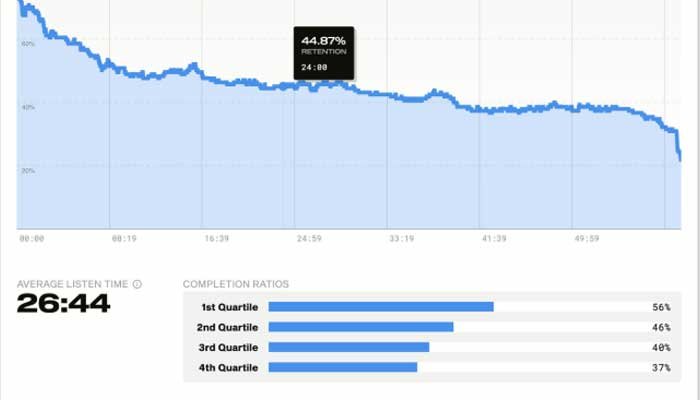
How to use retention analytics
Suppose you publish a hypothetical 50-minute interview.
Your retention graph shows a noticeable drop during the first two minutes.
That’s worth investigating.
You might discover that your introduction takes too long to explain what listeners will learn.
For the next episode, you could test opening with a compelling question or useful insight before introducing the guest.
Then compare retention across several episodes of similar length and format.
YouTube’s audience retention reporting is designed to show how different moments of a video hold viewer attention.
Pros
- Detailed video engagement reporting.
- Useful audience discovery metrics.
- Free analytics and comparison features.
- Helps evaluate titles, thumbnails, and episode openings.
Cons
- YouTube views aren’t the same as traditional podcast downloads.
- YouTube analytics don’t cover listening behavior in other podcast apps.
- Certain demographic and audience metrics may be limited.
My recommendation: If you’re building a video podcast, check YouTube Studio alongside your audio hosting analytics. Review discovery metrics separately from retention metrics so you can identify whether a problem involves attracting viewers or keeping them engaged.
4. Buzzsprout — Best Podcast Analytics Software for Beginners
Best for: Beginner podcasters who want clear, straightforward statistics.
Buzzsprout is a podcast hosting platform that also includes analytics.
Its main appeal is simplicity.
Instead of overwhelming creators with complicated reporting terminology, Buzzsprout presents important podcast statistics in an accessible format.
Its analytics include total downloads, episode performance, listening applications, devices, and listener locations.
The company also states that its reporting filters invalid bot activity.
Key features
- Overall podcast downloads.
- Downloads by episode.
- Listening app and device breakdowns.
- Geographic audience information.
- Episode performance comparisons.
- Industry-standard download reporting.
Practical example
Imagine you’re publishing a weekly podcast about personal finance.
Your last six episodes cover budgeting, credit cards, investing, retirement, saving, and debt repayment.
After comparing their first-week downloads, you notice that budgeting and debt repayment consistently perform well.
You could use that information to plan more episodes addressing practical money-management problems.
The goal isn’t to abandon every lower-performing topic. It’s to identify repeatable signals about your audience’s interests.
Pros
- Beginner-friendly interface.
- Podcast hosting and statistics in one platform.
- Useful download and geographic reporting.
- Free entry option.
Cons
- Detailed consumption analytics still depend on listening platforms.
- Primarily useful as part of Buzzsprout hosting.
- Free hosting has important limitations.
Buzzsprout’s published free plan includes two hours of uploads per month and hosts uploaded episodes for 90 days. Its current paid audio plan starts at $15 per month when billed annually.
My recommendation: Buzzsprout is a practical choice for new podcasters who also need hosting. But I wouldn’t recommend switching an established podcast to Buzzsprout solely for analytics without comparing its reporting to your current host.
5. Transistor — Best for Multiple Podcasts and Detailed Reporting
Best for: Businesses, podcast teams, and creators managing multiple shows.
Transistor combines podcast hosting with detailed performance reporting.
It is particularly useful if you publish multiple shows or want to compare episode results consistently over time.
One of its more practical reporting features is the ability to compare average episode downloads at specific points after publication.
According to Transistor, its analytics include average downloads after 7, 30, 60, and 90 days, as well as popular listening apps, device information, geographic reporting, and downloadable CSV files.
Key features
- Downloads by episode.
- Average downloads across defined time periods.
- Episode comparisons.
- Listening application breakdowns.
- Device and operating system reporting.
- Geographic audience data.
- CSV exports.
Why fixed-period comparisons matter
Suppose one episode has accumulated 2,000 downloads over six months, while another has received 1,200 downloads after only one week.
The older episode has more total downloads, but that doesn’t necessarily make it the stronger performer.
Comparing both episodes at seven days after publication creates a more useful baseline.
This is especially helpful when reporting performance to advertisers or evaluating your editorial strategy.
Pros
- Detailed download reporting.
- Useful multi-show management.
- Consistent episode comparison options.
- CSV exports for custom reporting.
Cons
- Requires paid hosting.
- Subscriber estimates aren’t exact.
- Doesn’t provide listening completion data for every podcast app.
Transistor explicitly describes its subscriber count as an estimate based on early download activity rather than a precise count of individual RSS subscribers.
My recommendation: Transistor is worth considering if you’re managing several podcasts or need more structured reporting. Its time-based episode comparisons are especially useful for tracking growth without relying on misleading lifetime-download comparisons.
6. Captivate — Best for Podcast Growth and Marketing Attribution
Best for: Podcasters who want to connect promotional activity with audience growth.
Captivate is a podcast hosting platform with a strong emphasis on audience growth and marketing.
Alongside its download analytics, Captivate offers tools for analyzing promotional links.
Its official documentation describes IAB-certified analytics, link analysis, and attribution links intended to help creators evaluate podcast promotion.
Key features
- Podcast download analytics.
- Episode and audience reporting.
- IAB-certified measurement.
- Promotional link tracking.
- Attribution link analysis.
- Multi-show reporting.
How attribution can help
Imagine you’re promoting a new episode through three channels:
- An email newsletter.
- Instagram.
- A guest appearance on another podcast.
Instead of using the same promotional URL everywhere, you create a separate trackable link for each channel.
You can then evaluate which links produce engagement and how those activities relate to your podcast’s performance.
However, an important limitation remains: a promotional link click is not the same as a confirmed new podcast listener.
People may click without listening, listen later on another device, or discover the podcast through an entirely different route.
Attribution data is useful, but it should be treated as evidence of promotional activity rather than a perfect record of listener acquisition.
Pros
- Useful podcast marketing features.
- Podcast hosting and analytics in one service.
- Promotional attribution capabilities.
- Supports multiple podcasts.
Cons
- No permanent free hosting plan.
- Attribution cannot capture every listener journey.
- More features may be unnecessary for beginners.
Captivate’s published annual-billing price starts at $17 per month for its Personal plan, which includes up to 30,000 monthly downloads.
My recommendation: Captivate makes sense when you’re actively experimenting with podcast promotion and want to evaluate your campaigns. If your main goal is simply checking downloads once a month, you may not need its full feature set.
7. Podtrac — Best for Independent Podcast Measurement
Best for: Podcasters who want independent audience measurement and advertiser-oriented reporting.
Podtrac is different from many of the other options on this list.
Rather than primarily functioning as a podcast hosting service, it focuses on audience measurement.
That distinction can matter when you need independent reporting for advertisers, sponsors, or business partners.
Podtrac provides a free base measurement service and describes its measurement methodology as compliant with recognized podcast measurement guidelines.
Key features
- Independent podcast measurement.
- Audience reporting.
- Demographic reporting options.
- Advertiser-oriented measurement.
- Free base service.
When it makes sense
Suppose you’re preparing to approach sponsors for a business podcast.
A potential advertiser wants to know how your show performs.
Your hosting dashboard provides a useful starting point, but independent measurement may offer another level of reporting confidence.
That doesn’t mean Podtrac automatically replaces your current statistics or that every sponsor requires it.
It means you have an additional measurement option available when independent reporting is valuable.
Pros
- Free base measurement.
- Focused on podcast audience reporting.
- Useful for advertiser discussions.
- Doesn’t require choosing it as your podcast host.
Cons
- Setup and measurement configuration are required.
- Not designed to replace every hosting feature.
- May offer more measurement infrastructure than a casual podcaster needs.
My recommendation: Consider Podtrac if you’re developing sponsorship relationships or want measurement beyond your hosting dashboard. Smaller podcasts can usually begin with their hosting provider and platform-native analytics.
Which Podcast Analytics Tool Should You Choose?
There isn’t one perfect podcast data tool for everyone.
The best choice depends on your publishing setup and the questions you’re trying to answer.
| Your Situation | Recommended Tool |
|---|---|
| You have a new podcast | Your hosting dashboard + Spotify for Creators |
| You want to understand listening completion | Apple Podcasts Connect |
| You publish video podcasts | YouTube Studio |
| You need beginner-friendly hosting analytics | Buzzsprout |
| You manage several podcasts | Transistor |
| You want to evaluate promotions | Captivate |
| You need independent audience measurement | Podtrac |
One approach I recommend is to start with the analytics already available to you before adding paid software.
Your hosting provider can generally help you understand download activity across podcast applications.
Apple Podcasts and Spotify can provide additional insight into their own audiences.
YouTube Studio adds another important perspective if you distribute video episodes.
Together, these tools often give creators enough information to begin making meaningful improvements without purchasing another analytics subscription.
What Podcast Metrics Should You Actually Track?
Having access to podcast statistics isn’t the same as understanding them.
A dashboard might contain dozens of metrics, but only a handful may be essential for your current goals.
Here are the ones I would prioritize.
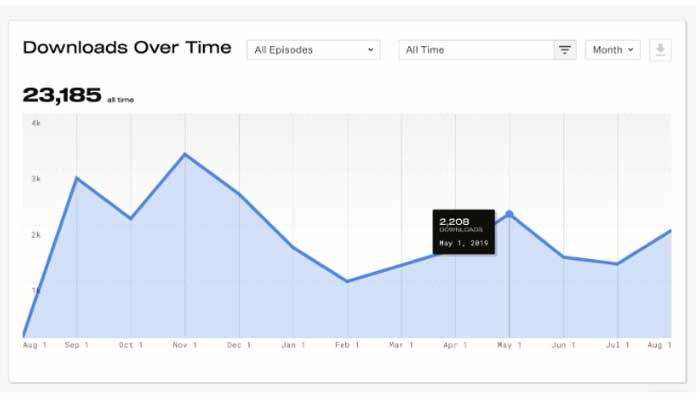
1. Episode downloads
Downloads help you understand the distribution of your podcast episodes.
They are particularly useful for comparing performance over time, monitoring growth, and preparing advertising reports.
However, a download doesn’t necessarily mean someone listened to the entire episode.
A podcast application might download an episode automatically, or someone might stop listening shortly after playback begins.
For this reason, download analytics should not be treated as exact listener counts.
2. Unique listeners
Unique listeners help estimate how many individual people or devices engage with your content, depending on the platform’s methodology.
The distinction matters because one person can download multiple episodes.
Similarly, one listener might play an episode several times.
Different analytics platforms identify unique listeners differently, so their totals should not automatically be combined.
3. Audience retention
Retention describes how effectively your content keeps people listening or watching.
It can help you evaluate:
- Episode introductions.
- Content pacing.
- Interview structure.
- Topic relevance.
- Listener interest throughout an episode.
Retention is particularly useful when identifying places where audiences stop consuming your content.
4. Average consumption
Average consumption indicates how much of an episode listeners consume on average.
For example, an average consumption rate of 75% suggests listeners consumed roughly three-quarters of the episode on average, according to the reporting platform’s methodology.
This doesn’t mean 75% of listeners completed the entire episode.
Those are different measurements.
Apple Podcasts also notes that average consumption can exceed 100% when content is played more than once.
5. Audience location
Geographic reporting helps you understand where your podcast attracts listeners.
For US-focused podcasts, geographic information can be useful when developing locally relevant content or preparing sponsorship proposals.
For example, a podcast about Texas small businesses might want to monitor whether it reaches audiences in Houston, Dallas, Austin, and other relevant markets.
Remember that podcast location reporting is generally inferred from technical data and isn’t always exact.
6. Listening platforms
Knowing which podcast applications your audience uses can help you prioritize distribution and promotional activity.
For example, if much of your audience engages through Apple Podcasts, reviewing your show’s Apple Podcasts performance becomes especially useful.
If YouTube is driving most of your new audience discovery, video titles, thumbnails, and retention may deserve additional attention.
The important thing is to connect the metric to an actual decision.
How to Use Podcast Analytics to Grow Your Show
Collecting data is relatively easy. Turning it into useful decisions takes more thought.
Here’s a straightforward process you can follow.
Step 1: Establish your baseline
Start by reviewing your last five to ten episodes.
Record their downloads after a consistent time period, such as seven or 30 days following publication.
Don’t compare a two-day-old episode against one that has been available for six months without accounting for the difference.
Step 2: Identify patterns
Look for meaningful similarities among your strongest episodes.
Ask yourself:
- Do certain topics consistently attract more listeners?
- Are shorter episodes performing better than longer ones?
- Do guest interviews outperform solo episodes?
- Are recent episodes gaining downloads faster than older episodes did?
- Which subjects encourage stronger engagement?
Avoid drawing conclusions from one unusually successful episode.
Several consistent results provide a more useful basis for editorial decisions.
Step 3: Review engagement
Next, examine retention and consumption metrics where they’re available.
An episode with strong downloads but weak listening engagement may have attracted attention without delivering the experience listeners expected.
That might suggest a mismatch between the title and the content, an overly long introduction, or pacing problems.
It doesn’t prove any one explanation, but it gives you a starting point.
Step 4: Make one improvement
Choose a specific change to evaluate.
You might:
- Shorten episode introductions.
- Focus titles on clearer listener benefits.
- Test a different episode structure.
- Publish follow-up episodes on popular topics.
- Improve audio quality.
- Experiment with different promotional channels.
Try not to change everything at once.
Otherwise, it becomes difficult to determine which changes might be helping.
Step 5: Review the results
After publishing several episodes, compare the results with your baseline.
Use equivalent reporting periods and similar episode types.
Consider both reach and engagement.
An increase in downloads is encouraging, but stronger engagement can indicate that you’re attracting people who genuinely value your podcast.
A Simple Podcast Analytics Tracking Template
You don’t need complicated podcast reporting tools to build a useful tracking routine.
A spreadsheet can be enough.
Here’s a hypothetical monthly example:
| Metric | August | September | Change |
|---|---|---|---|
| Total downloads | 3,000 | 3,600 | +20% |
| Average 7-day downloads per new episode | 400 | 480 | +20% |
| New episodes published | 4 | 4 | No change |
| YouTube watch time | 120 hours | 150 hours | +25% |
These numbers are illustrative, not actual podcast industry statistics.
This example suggests improvement in both podcast downloads and YouTube watch time.
But it doesn’t establish why those changes occurred.
To investigate, you would look at factors such as episode topics, promotional activity, release timing, and audience retention.
Also, remember that total downloads and YouTube watch time measure different activities. They should be evaluated separately rather than combined into one overall engagement figure.
A useful monthly review should answer three questions:
- What improved or declined?
- What might explain the change?
- What should I test or improve next month?
That’s far more valuable than simply recording larger numbers.
Common Podcast Analytics Mistakes to Avoid
Treating downloads as people
A podcast with 10,000 downloads doesn’t necessarily have 10,000 individual listeners.
One person may download several episodes, and some downloaded episodes may never be played.
Use the metric names and definitions supplied by your analytics platform.
Adding incompatible platform metrics together
Spotify plays, YouTube views, and hosting-provider downloads may follow different measurement rules.
Adding them together doesn’t automatically produce an accurate total audience number.
Keep these measurements separate unless you have a clearly defined methodology.
Checking statistics too frequently
Watching daily numbers can be distracting, especially for smaller podcasts.
Short-term fluctuations are normal.
A weekly performance review and a more detailed monthly analysis are often more practical than repeatedly checking the dashboard throughout the day.
Ignoring listening engagement
Download growth is encouraging, but it doesn’t tell the full story.
If more people discover your podcast but few continue listening, improving the content experience may matter more than increasing promotion.
Comparing episodes without context
Episode age, topic, length, seasonality, and marketing activity can all affect performance.
Make comparisons as consistent as possible.
For example, compare first-week performance for episodes of similar formats rather than lifetime downloads for episodes released months apart.
Relying on outdated software recommendations
Podcast analytics platforms change over time.
Some add new features. Others change pricing or discontinue services.
For example, Chartable, a once-popular podcast analytics and attribution platform, officially shut down on December 12, 2024. It should not be recommended as an active analytics solution in 2026.
Free vs. Paid Podcast Analytics Tools: Which Is Better?
Free tools are often sufficient for new podcasts.
Spotify for Creators, Apple Podcasts Connect, and YouTube Studio provide valuable reporting without requiring a separate analytics subscription.
Your podcast hosting service may already include download statistics.
Paid hosting and analytics solutions become more attractive when you need additional capabilities.
For example, you might need detailed multi-show reporting, promotional attribution, team access, custom exports, or advertiser-oriented analytics.
Here’s how I would approach the decision.
Choose free analytics if:
- You’re starting your first podcast.
- You mainly want to track growth and engagement.
- You don’t need complex reporting.
- You’re still learning which metrics matter.
Consider paid analytics capabilities if:
- You’re managing multiple podcasts.
- You’re running marketing campaigns.
- You regularly prepare reports for sponsors.
- You need advanced exports or reporting workflows.
- Your existing tools don’t answer important questions.
One important consideration is that paying for a hosting platform doesn’t automatically unlock detailed retention data across every listening application.
That information often comes from the listening platforms themselves.
Before paying for new software, identify the specific reporting problem you’re trying to solve.
Frequently Asked Questions
Final Thoughts: Choose Analytics That Help You Make Decisions
The best podcast analytics tools aren’t necessarily the ones with the most features.
They’re the tools that help you understand your audience and improve your podcast.
For beginners, I’d start with Spotify for Creators, Apple Podcasts Connect, and the statistics included with your podcast host.
If you’re publishing video, add YouTube Studio.
As your podcast grows, platforms such as Buzzsprout, Transistor, Captivate, and Podtrac may provide additional reporting capabilities depending on your needs.
With more than two years of experience working with digital content, my practical perspective is that analytics become most useful when you connect the numbers to a specific action.
Don’t focus only on whether your downloads increased.
Ask which episodes earned attention, where audiences stopped engaging, and what you can improve next.
The goal isn’t simply to collect more podcast data. It’s to use that data to create a podcast people genuinely want to keep listening to.