You can start a podcast for $0 if you already own a smartphone or computer, although spending about $100 to $350 upfront usually gives a beginner noticeably better sound and a more comfortable recording setup.
Your ongoing podcast expenses can also be free. However, many independent podcasters eventually spend $15 to $50 per month on hosting, remote recording, editing, design, or other tools.
Here’s the short version:
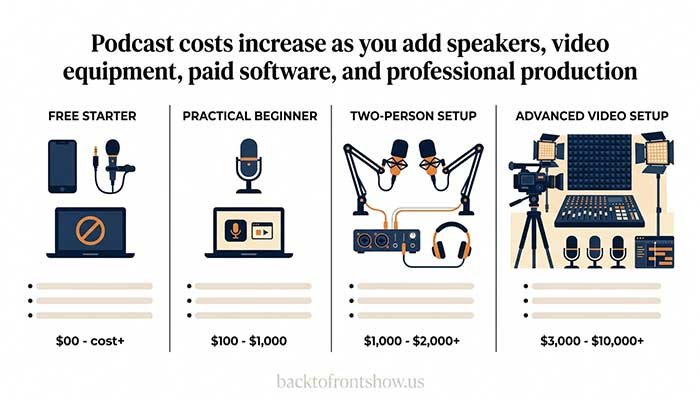
| Podcast setup | Upfront cost | Typical monthly cost | Best for |
|---|---|---|---|
| Free starter setup | $0–$100 | $0 | Testing an idea or publishing a limited series |
| Practical beginner setup | $100–$350 | $0–$20 | Most new solo and interview podcasts |
| Two-person setup | $350–$900 | $0–$50 | Recording two people in the same room |
| Advanced or video setup | $1,000–$5,000+ | $20–$200+ | Businesses, studios, and serious video production |
These estimates assume you already have a usable phone or computer. Hiring an editor, producer, designer, or marketing team can increase the budget substantially.
Prices in this guide were checked in October 2026, but software subscriptions and equipment prices can change.
What Determines Your Podcast Startup Cost?
The cost of starting a podcast depends mainly on four decisions:
- Will you record alone, remotely, or with people in the same room?
- Will you produce audio only or add video?
- Will you edit the episodes yourself?
- Do you already own a suitable phone or computer?
A solo audio podcast recorded in a quiet bedroom may need only one USB microphone. An in-person show with three hosts could require three microphones, an audio interface, stands, headphones, and more cables. Video adds cameras, lighting, storage, and a more complicated editing process.
In my experience, beginners often focus too much on creating a “professional studio” before they’ve proven that they can publish consistently. A clear format, a quiet room, and good microphone technique usually matter more than buying an expensive microphone during the first week.
Read More: How To Start A Podcast For Free: Complete Beginner’s Guide
Podcast Cost Breakdown
Podcast microphone cost: $0 to $300 or more per person
Your microphone has one of the biggest direct effects on how your show sounds, but you don’t need the most expensive model.
You have three practical starting options:
1. Use your phone or computer microphone: $0
A recent smartphone can produce acceptable audio when you:
- Record in a quiet, furnished room.
- Keep the phone six to eight inches from your mouth.
- Turn off fans and noisy appliances.
- Place the phone on a stable surface instead of holding it.
- Avoid large, empty rooms that create echoes.
This approach is useful for testing an idea. It’s less suitable for a long-term show because built-in microphones may capture room noise, keyboard sounds, and echoes.
2. Buy a beginner USB microphone: approximately $50 to $150
A USB microphone plugs directly into a computer, so it doesn’t require a separate audio interface. For most new podcasters, this is the simplest paid setup.
The Audio-Technica ATR2100x-USB is one example. It supports both USB and XLR connections, includes a headphone output for direct monitoring, and has been listed at an indicative US price of $79. Its USB connection works for a beginner setup, while the XLR output provides an upgrade path if you later buy an audio interface. Audio-Technica’s documentation provides its specifications and listed price.
The Samson Q2U is another USB/XLR dynamic microphone designed for spoken-word recording. According to Samson’s official product page, its package includes a desktop stand, windscreen, USB cable, and XLR cable. Bundled accessories can reduce your total startup cost.
Retail prices and included accessories change, so compare the complete package rather than looking only at the microphone price.
3. Buy a premium USB or XLR microphone: approximately $200 to $400+
A more expensive microphone may provide better construction, controls, processing, or connection options. It won’t automatically fix echoes, background noise, or poor microphone placement.
If you choose an XLR-only microphone, remember to include the cost of an audio interface, cable, stand, and possibly a preamp. The microphone’s advertised price won’t represent the complete setup.
Audio interface or mixer: $0 to $500+
You don’t need an audio interface when using a USB microphone directly with your computer.
You may need one if:
- Your microphone has only an XLR connection.
- You want to record two or more people in the same room.
- You need separate audio tracks for each speaker.
- You want physical gain controls and more routing options.
A basic interface for one or two microphones often costs around $100 to $250. Interfaces with four or more microphone inputs cost more.
Before buying, check the number of actual microphone inputs—not just the number of connections printed on the box. If four people will record together, a two-input interface isn’t enough.
Headphones: $0 to $115 or more per person
You can begin with wired earbuds you already own. Wired headphones are preferable to Bluetooth during recording because Bluetooth can add delay and may switch into a lower-quality call mode.
Closed-back headphones are especially useful because they reduce the chance that sound from your headphones will leak into the microphone.
As a current professional example, Sony lists its closed-back MDR-7506 monitoring headphones at $114.99 on the official Sony product page. You don’t need to spend that much when starting, but it shows what a commonly used monitoring headphone can cost.
For a multi-person podcast, each participant should ideally have headphones. You may also need a headphone splitter or headphone amplifier.
Read More: Best Podcast Recommendations: Top Podcasts Worth Listening To in 2026
Microphone stand, pop filter, and cables: $25 to $150
Small accessories are easy to overlook when building a podcast budget.
Common purchases include:
- Desktop stand or boom arm: $20–$100
- Pop filter or foam windscreen: $10–$30
- XLR cable: $10–$30 per microphone
- USB adapter or hub: $10–$50
- Headphone splitter or amplifier: $10–$100+
Check what comes with your microphone. A $70 microphone package that includes a stand, windscreen, and cables may be a better value than a $60 microphone that includes nothing else.
Computer or smartphone: $0 if you already own one
Most beginners don’t need to buy a computer specifically for podcasting. A relatively recent laptop, desktop, or smartphone can usually record and edit a straightforward audio show.
A new computer becomes a significant expense—often several hundred dollars or more—so test your current device first.
Video, complex multitrack projects, and long recordings require more processing power and storage than a basic solo audio podcast.
Recording and editing software: $0 to about $23 per month
Free software is enough for many podcasts.
Audacity is a free, open-source audio recorder and editor available for Windows, macOS, and Linux. Mac users can also record and edit with GarageBand.
Paid software may offer faster workflows, text-based editing, advanced restoration, collaboration tools, or integrated video features. For example, Adobe currently lists Audition at $22.99 per month on an annual plan billed monthly. Always check the official Adobe Audition page for current pricing and contract terms.
My usual recommendation for a beginner is to use free editing software until a specific limitation is slowing down production. Paying for features you don’t yet understand rarely makes publishing easier.
Remote interview recording: $0 to $30+ per month
If you interview guests online, ordinary meeting software can work, but a dedicated remote recording platform may deliver better results by recording each participant locally and saving separate tracks.
Some platforms offer free plans with limits. For example, Riverside’s pricing page currently lists a free plan with two hours of separate-track recording and a Standard plan starting at $15 per month when billed annually, or $19 on monthly billing.
Before paying for remote recording software, compare:
- Monthly recording limits
- Separate audio and video tracks
- Download quality
- Watermarks
- Guest requirements
- Backup recording
- Storage limits
- Cancellation terms
Always ask remote guests to wear headphones and record in the quietest available room. Software can’t fully remove a loud television, an empty echoing room, or a weak internet connection.
Podcast hosting cost: $0 to $50+ per month
A podcast host stores your episode files and creates the RSS feed that podcast apps use to find and deliver your show.
Free hosting is available. Spotify for Creators currently advertises free hosting, uploads, storage, distribution, and analytics.
Paid hosting commonly begins around $15 to $20 per month:
- Buzzsprout lists an audio plan at $15 per month when billed annually. Its free plan allows two upload hours per month, but episodes on that plan are hosted for only 90 days.
- Transistor lists its Starter plan at $19 per month, including multiple podcasts, collaborators, analytics, and a built-in website.
Free hosting can be a sensible choice. Paid hosting may be worth considering when you need stronger support, multiple shows, private feeds, team access, advanced analytics, or specific publishing features.
Check the current plan limits before choosing a host. Migrating a podcast later is possible, but selecting a host that fits your expected workflow can save time.
Podcast directory submission: usually $0
You generally don’t pay separate fees every time your public podcast appears in a listening app. Your host creates an RSS feed, and you submit that feed to podcast directories.
Apple allows creators to submit an RSS-based show through Apple Podcasts Connect. Its official submission instructions explain the review and validation process.
Apple’s optional paid program for subscription features is different from submitting a normal free RSS podcast. Don’t assume you need a paid subscription program simply to make a public podcast available.
Podcast artwork: $0 to several hundred dollars
You can create basic cover art yourself with a free design tool. Canva currently offers a free individual plan with templates and design features that can be used for podcast artwork.
Hiring a designer costs more, with the final price depending on the designer, number of concepts, illustration requirements, and revision policy.
Your cover art should:
- Remain readable at thumbnail size.
- Use a short, clear title.
- Avoid too many small visual details.
- Match your subject and intended audience.
- Use only images and fonts you have permission to use.
Don’t spend heavily on artwork before confirming your show name and concept.
Music and sound effects: $0 to hundreds of dollars
Free or paid music can work, but “available online” does not mean “free to use.”
Use music you created yourself or obtained under a license that clearly covers podcast use. Save a copy of the license and purchase receipt. Also check whether the license covers monetized content, advertising, social clips, and perpetual use of already-published episodes.
Using part of a commercial song as an intro simply because the clip is short can still create copyright problems. When the rights are unclear, don’t use it.
Room treatment: $0 to $500+
You don’t need foam panels covering every wall. Start by improving the room for free:
- Choose a small, furnished room.
- Close curtains.
- Record away from bare walls and windows.
- Add rugs, blankets, cushions, or soft furniture.
- Turn off fans, air conditioners, and appliances when practical.
- Position the microphone close to your mouth.
A dynamic microphone used close to the speaker is often a practical choice in an untreated room because it typically captures less surrounding sound than a sensitive condenser microphone.
A common mistake I’ve noticed is buying a better microphone while continuing to record several feet away from it in an echoing room. Moving a suitable microphone closer can improve the recording more than an expensive equipment upgrade.
Podcast website: $0 to $300+ per year
A separate website is optional when you’re starting. Many podcast hosts include a basic show page.
A custom website can become useful if you want:
- Search-friendly episode articles
- Email signup forms
- Sponsor information
- Detailed guest pages
- Products, services, or memberships
- Greater control over your brand
Costs may include a domain name, website hosting, a premium theme, and paid plugins. If your podcast has no audience yet, it’s reasonable to begin with the page supplied by your podcast host and build a larger website later.
Podcast production and outsourcing: highly variable
Professional help can become the largest podcast expense.
You might hire someone for:
- Audio editing
- Noise reduction and mixing
- Video editing
- Show notes
- Transcription
- Artwork
- Guest research
- Booking and scheduling
- Social clips
- Publishing
- Full production management
Pricing depends on episode length, number of speakers, recording quality, turnaround time, and how much work is included. Ask for a written scope before comparing quotes.
An inexpensive editor who only removes obvious mistakes isn’t offering the same service as a producer who restructures an episode, mixes it, writes the show notes, creates video clips, and uploads everything.
Three Realistic Podcast Budgets
Budget 1: A free test podcast
Estimated startup cost: $0
A hypothetical creator could use:
- An existing smartphone
- Wired earbuds already owned
- A quiet bedroom or closet
- Free recording and editing software
- Spotify for Creators for hosting
- Canva Free for cover art
- No paid advertising
This setup is suitable for recording a pilot or testing a short series. Its main limitation is consistency: built-in microphones and changing recording locations can produce uneven audio.
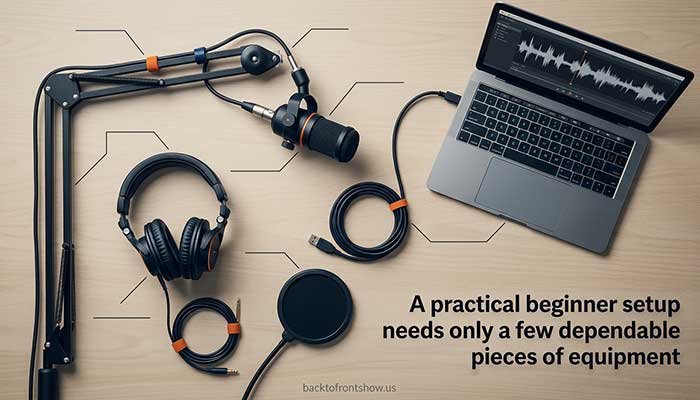
Budget 2: A practical solo podcast
Estimated startup cost: $150 to $300
Estimated monthly cost: $0 to $20
A sample budget might include:
| Item | Example budget |
|---|---|
| USB/XLR dynamic microphone | $80–$150 |
| Boom arm or desktop stand | $25–$60 |
| Pop filter or windscreen | $10–$20 |
| Wired headphones | $25–$70 |
| Editing software | $0 |
| Hosting | $0–$20 per month |
| Artwork | $0 |
| Estimated upfront total | $140–$300 |
This is the range I think makes sense for many beginners. It provides a dedicated microphone and a repeatable recording position without turning the first episode into a major financial commitment.
Budget 3: A two-person in-room podcast
Estimated startup cost: $500 to $900
Estimated monthly cost: $0 to $50
A hypothetical two-host setup might include:
| Item | Example budget |
|---|---|
| Two XLR microphones | $160–$400 |
| Two-input audio interface | $120–$250 |
| Two stands and two cables | $70–$160 |
| Two pairs of headphones | $50–$200 |
| Basic room improvements | $0–$100 |
| Hosting and software | $0–$50 per month |
| Estimated upfront total | $400–$1,110 |
The total depends heavily on the microphones and headphones selected. Buying a reliable interface with enough inputs is more important than paying for cosmetic extras.
How Much Does a Video Podcast Cost?
A video podcast can start with a smartphone, but a polished multi-camera setup quickly increases the budget.
Possible video expenses include:
- Camera or smartphone mounts
- Additional cameras
- Lighting
- Tripods
- Capture devices
- Larger memory cards
- External storage
- Video editing software
- A more powerful computer
- A visually presentable recording space
- Longer editing time
A simple one-camera video setup may add less than $200 if you already have a good smartphone. A multi-camera studio can cost several thousand dollars.
Video also creates a time cost. Synchronizing cameras, correcting color, switching angles, adding captions, and exporting multiple formats can make each episode considerably more complicated.
If the podcast’s value doesn’t depend on video, starting with audio is often the more sustainable choice.
Costs You Can Skip at the Beginning
You probably don’t need these for your first few episodes:
- A $400 microphone
- An expensive mixer for one USB microphone
- A custom-built studio
- Multiple cameras
- Paid advertising
- A large custom website
- Premium editing software
- A long, professionally composed intro
- Branded merchandise
- Every accessory recommended in equipment videos
Start with the equipment required to record clean, understandable audio. Upgrade only when you can explain the problem the new purchase will solve.
Podcast Expenses Beginners Often Forget
Replacement and backup equipment
Cables fail, storage fills up, and recordings can become corrupted. Budget for an extra cable and keep at least one backup recording when possible.
Cloud storage
Audio projects, uncompressed recordings, and video files can consume significant storage. Free storage may be enough initially, but long-running shows often need a paid plan or external drive.
Taxes and transaction fees
Listed software and equipment prices may not include applicable sales tax. International guests, contractors, or subscription payments can also create transaction fees.
Your time
Even when the cash cost is zero, podcasting takes time. Planning, recording, editing, writing descriptions, creating artwork, publishing, and promotion all compete with other work.
Treat time as part of your podcast production cost. A format you can publish consistently is more useful than an ambitious format that becomes exhausting after three episodes.
How to Build Your Podcast Budget
Step 1: Choose the simplest workable format
Decide whether the show will be:
- Solo
- Remote interview
- In-person interview
- Co-hosted
- Audio only
- Audio and video
The format determines how many microphones, inputs, headphones, cameras, and software subscriptions you may need.
Step 2: List what you already own
Check your current:
- Computer
- Smartphone
- Wired headphones
- Quiet recording space
- Microphone
- Cables
- Storage
- Editing software
Don’t buy replacements until you’ve tested what you have.
Step 3: Separate essential and optional expenses
For a solo audio podcast, the essential list may be only:
- Recording device
- Microphone
- Headphones
- Editing software
- Podcast host
Artwork, a custom website, paid music, remote recording software, and advertising may be optional.
Step 4: Calculate the first-year cost
Use this formula:
First-year podcast cost = one-time equipment + 12 months of subscriptions + outsourced production + marketing
For example, imagine a beginner spends:
- $120 on a microphone
- $40 on a boom arm
- $60 on headphones
- $19 per month on hosting
- $0 on editing software
The first-year cost would be:
$120 + $40 + $60 + ($19 × 12) = $448
That doesn’t mean everyone must spend $448. The example simply shows why monthly subscriptions should be included in the budget.
Step 5: Leave room for unexpected costs
Keep roughly 10% to 15% of your equipment budget unassigned for adapters, cables, storage, shipping, or other small items.
How to Spend Less Without Hurting Quality
- Buy one good microphone instead of several unnecessary accessories.
- Use free editing software while learning.
- Record in the best room available before buying acoustic products.
- Use a host’s included podcast page at first.
- Create simple cover art with a free design tool.
- Ask remote guests to use headphones.
- Record audio before investing in video.
- Publish a short pilot season before paying annually for several tools.
- Compare package contents, warranties, and return policies.
- Upgrade when a repeated problem affects your episodes.
What I’ve learned is that a small, dependable setup is usually better than a complicated one that takes too long to prepare. If recording requires reconnecting ten devices and troubleshooting several apps, consistency becomes harder.
Common Podcast Budget Mistakes
Buying equipment before choosing a format
A solo show, a remote interview show, and a four-person studio require different equipment. Define the format first.
Assuming an expensive microphone removes background noise
Microphones record what reaches them. A noisy or reflective room will remain a problem until you improve the room, microphone position, or recording technique.
Paying for overlapping software
Some hosting, recording, editing, transcription, and design platforms include similar features. Check what your existing tools already provide before adding another subscription.
Ignoring renewal prices
A discounted introductory price may not be the long-term price. Check billing frequency, renewal terms, cancellation rules, and limits.
Starting with video because it seems mandatory
Video can help discovery and create promotional material, but it isn’t required for a useful podcast. It adds equipment, storage, editing, and production time.
Spending the entire budget before publishing
Record several test episodes first. You may discover that you need a quieter room or better stand—not a more expensive microphone.
So, What Should a Beginner Budget?
For most beginners who already own a computer, I’d recommend planning for:
- $100 to $350 upfront
- $0 to $20 per month initially
- A small reserve for cables, storage, or replacement accessories
That budget can cover a reliable USB microphone, a stand, wired headphones, free editing software, and either free or entry-level podcast hosting.
If you’re only testing an idea, start for free. If you’re recording two or more people in the same room, expect to spend more on microphones, headphones, and an interface with enough inputs.
The best podcast budget isn’t the largest one. It’s the smallest setup that gives you clear audio, fits your format, and makes it realistic to keep publishing.