A podcast is a series of audio (or audio-and-video) episodes that you can stream or download on demand, usually organized around a specific topic, host, or theme. Instead of tuning in at a set broadcast time like traditional radio, you choose what to listen to and when — on your phone, in your car, or through a smart speaker.
That “on your own time” part is really the whole point. Podcasts fit into whatever you’re already doing: commuting, walking the dog, doing dishes, working out. There’s a show for almost everything, from true crime and comedy to business advice and deep dives into niche hobbies.
In this guide, I’ll walk you through what a podcast actually is, how the technology behind it works, the different types of podcasts you’ll come across, and exactly how to start listening if you’re brand new to this. By the end, you’ll understand podcasting well enough to find your first show and know what you’re looking at.
Podcast Definition: The Simple Explanation
A podcast is a collection of episodic audio or video content that’s distributed through an RSS feed, which lets podcast apps automatically check for and deliver new episodes to subscribers. Each podcast typically has:
- A consistent host or hosts
- A specific topic, theme, or format
- Regularly released episodes (weekly, biweekly, daily, or on whatever schedule the creator sets)
- Individual episode titles and descriptions
- A subscribe option so listeners get new episodes automatically
Think of it like a radio show or a magazine column, except it’s on-demand, free in the vast majority of cases, and you can play it whenever you want.
How Podcasts Work (Without the Technical Jargon)
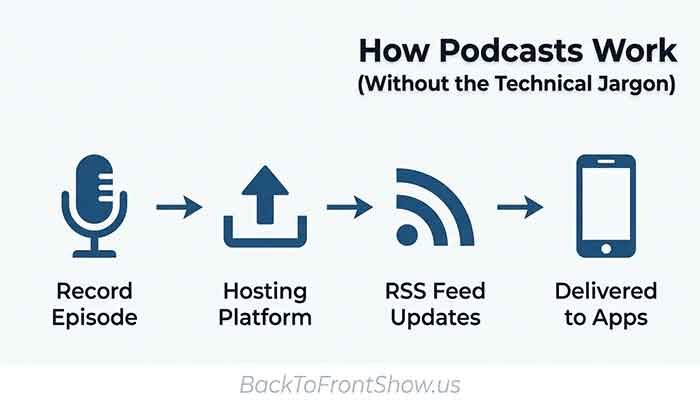
Here’s the part that trips a lot of beginners up: how does a new episode magically show up in your app the moment it’s released? The answer is a technology called RSS (Really Simple Syndication).
- A creator records and edits an episode. This could be a solo host talking into a microphone, an interview between two people, or a full production with sound effects and music.
- The episode is uploaded to a podcast hosting platform. This is different from a directory like Apple Podcasts or Spotify — the hosting platform actually stores the audio file and generates the RSS feed.
- The hosting platform creates or updates an RSS feed. This feed is essentially a structured file that lists every episode, along with its title, description, and audio link.
- Podcast apps and directories “read” that RSS feed. When you subscribe to a show in an app like Apple Podcasts or Spotify, your app checks the podcast’s RSS feed periodically. When a new episode appears in the feed, your app downloads or streams it automatically.
You don’t need to understand any of the technical details to enjoy podcasts as a listener — this happens invisibly in the background. But it’s genuinely useful to know if you’re a beginner because it explains why podcasts work differently from something like a YouTube channel, where content lives inside a single platform.
One thing I’ve noticed working around podcast analytics: because RSS is an open standard rather than something owned by one company, a single podcast can appear on dozens of apps and directories at once, all pulling from the same feed. That’s part of why podcasting has grown the way it has — creators aren’t locked into one platform the way they are on most social media.
Podcasts vs. Radio vs. YouTube Videos: What’s the Difference?
| Feature | Podcast | Traditional Radio | YouTube Video |
|---|---|---|---|
| When you listen | On demand, any time | Live broadcast schedule | On demand, any time |
| Subscription model | Free RSS subscription (mostly) | No subscription needed | Platform-based subscription |
| Distribution | Multiple apps via RSS feed | Radio frequency, limited to region | Single platform (YouTube) |
| Typical format | Audio, increasingly audio+video | Audio only | Video-first |
| Offline listening | Yes, usually downloadable | No | Limited (Premium required) |
| Ownership of audience | Creator owns the RSS feed and email list | Station owns the broadcast | Platform controls distribution and algorithm |
The biggest practical difference for a beginner is control. With radio, you catch what’s playing when you turn it on. With a podcast, you pick the exact episode, skip around, speed it up, or save it for later — and it follows you across apps because it’s not locked into one platform the way YouTube content is.
Types of Podcasts You’ll Come Across
Podcasts don’t follow one rigid format. As you start exploring, you’ll notice a few common structures:
- Interview shows — a host talks with a different guest each episode. Great for business, career, and pop culture topics.
- Solo/monologue shows — one host talking directly to the audience, often used for commentary, advice, or storytelling.
- Co-hosted conversation shows — two or more regular hosts discussing a topic together, often with a casual, back-and-forth tone.
- Narrative/documentary-style shows — scripted, produced episodes that tell a story over one or multiple episodes. Common in true crime and history podcasts.
- News and daily briefing shows — short, frequently released episodes that summarize current events.
- Fiction podcasts — scripted audio drama, similar to old-school radio plays.
- Educational/how-to shows — built around teaching a skill or explaining a subject in depth.
Imagine a weekly business podcast where a host interviews small-business owners about how they got started — that’s a straightforward example of an interview-style show built around a niche audience. None of that is a real podcast; it’s just an example to show how a format and topic come together.
Read More: What Is Podcast Analytics? A Beginner’s Guide to Podcast Data
Video Podcasts Are a Growing Category
If you’ve noticed podcasts showing up as videos on YouTube or Spotify lately, that’s not your imagination. According to Edison Research’s Podcast Consumer 2025 study, over half of the U.S. population age 12 and older has watched a video podcast, with 37% having watched one in the last month. Video podcasts are usually the same interview or conversation format as an audio show, just recorded on camera as well.
You don’t need video to enjoy podcasts — most shows are still audio-only, and that’s not going anywhere. But it’s worth knowing that “podcast” no longer means “audio only” the way it did a decade ago.
How to Listen to Podcasts (Step-by-Step for Beginners)
You don’t need any special equipment to start listening. Here’s the simplest path:
- Choose a podcast app. If you have an iPhone, the built-in Apple Podcasts app is already there. Android users often start with Spotify or Google’s YouTube Music, which now hosts podcasts as well. Other popular options include Pocket Casts and Overcast.
- Search for a topic or show name. Most apps let you search by keyword, so you can type something like “personal finance” or “true crime” to see relevant shows.
- Look at the episode list and description. Read a few episode titles and the show description to get a feel for tone and format before committing.
- Hit subscribe or follow. This adds the show to your library and — depending on your app settings — automatically downloads new episodes.
- Start with a popular or recommended episode, not necessarily episode one. Many long-running shows suggest a “start here” episode for new listeners.
- Adjust playback speed if you want to. Most apps let you speed up playback (1.2x, 1.5x, etc.), which a lot of regular listeners use to get through more episodes.
I usually recommend that beginners start with just two or three shows rather than subscribing to a dozen at once. It’s easy to get overwhelmed by an unread episode list, and that’s often what makes people quit listening to podcasts altogether within the first few weeks.
Where to Find Podcasts
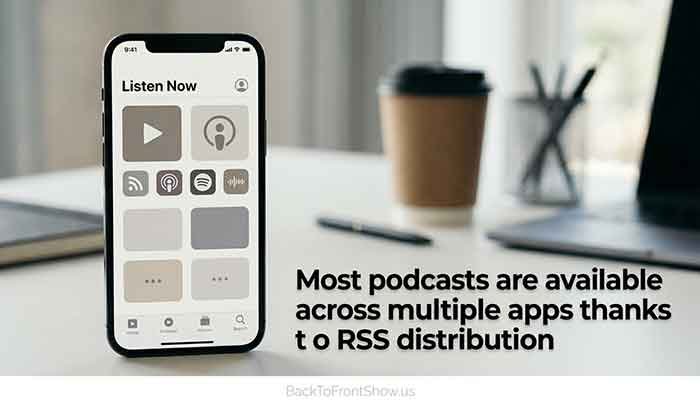
The apps and platforms below are among the most widely used ones in the U.S. as of 2025 and early 2026, based on industry tracking:
- Apple Podcasts — built into every iPhone, widely used for its large directory and features like transcripts and chapter markers.
- Spotify — combines music and podcasts in one app, with strong personalized recommendations and a large video podcast library.
- YouTube / YouTube Music — has become a major destination for video podcasts, with a majority of the U.S. population having watched a video podcast at some point.
- Amazon Music / Audible — podcasts are included for Amazon Music and Audible subscribers.
- Pocket Casts, Overcast, Podcast Addict — third-party apps favored by listeners who want more control over playlists, playback speed, and organization.
Where a podcast “lives” isn’t limited to one app — because of RSS distribution, the same show is usually available across most of these platforms at once, so you can typically listen wherever you already spend time.
Podcasting Is More Mainstream Than You Might Think
If you’re new to podcasts and wondering whether they’re actually worth your time, the data suggests a lot of people already think so. Edison Research’s Infinite Dial 2025 study found that 73% of Americans age 12 and older have consumed a podcast in either audio or video format, representing an estimated 210 million people. That figure represents an all-time high for the format.
Listening habits also vary quite a bit by age. In the same body of research, 66% of U.S. consumers aged 12-34 had listened to a podcast in the last month, compared with 61% of those aged 35-54 and 38% of those over 55. In other words, podcasts skew younger, but they’re far from a niche format at any age group.
One thing worth understanding as a beginner: these numbers change every year as new research comes out, so treat any specific percentage as a snapshot in time rather than a fixed fact.
Common Mistakes Beginners Make
A common mistake I’ve seen from people new to podcasts is judging a show by its very first episode. Many hosts get more comfortable and the production quality improves significantly after the first ten or twenty episodes — so if episode one feels rough, it’s worth checking a recent episode before writing the whole show off.
A few other things to watch out for:
- Subscribing to too many shows at once. This leads to a cluttered, overwhelming feed and often causes people to stop listening altogether.
- Expecting every episode to be equally strong. Even great shows have inconsistent episodes — skip around if one doesn’t grab you.
- Not adjusting playback speed. If a host talks slowly for your taste, most apps let you speed things up without much distortion.
- Ignoring show notes. Episode descriptions often include timestamps, links, and context that make the episode easier to follow.
Key Takeaways
- A podcast is an on-demand series of audio or video episodes distributed through an RSS feed, which is what lets you subscribe and get new episodes automatically.
- Podcasts differ from radio (no live schedule) and from platform-locked video content (an RSS-based podcast typically appears on many apps at once).
- Common formats include interviews, solo commentary, co-hosted conversations, narrative/documentary shows, and fiction.
- You can start listening today with just a smartphone and a free app like Apple Podcasts, Spotify, or YouTube Music.
- Podcast listening is genuinely mainstream in the U.S., with the majority of Americans age 12+ having consumed a podcast according to recent Edison Research data.
- Start with two or three shows, not ten, and don’t judge a podcast by its very first episode.