The best podcast marketing tools are the ones that remove repetitive work from promoting each episode.
For most independent podcasters, you don’t need one expensive all-in-one platform. A practical setup usually combines a few specialized tools: one for turning episodes into social content, one for scheduling posts, one for email, and one for creating a searchable home for your podcast.
My top choices are Headliner for podcast-specific promotion, OpusClip for turning video podcasts into short clips, Buffer for social scheduling, Kit for email marketing, and Podpage for building a podcast website.
Here is the quick comparison.
| Tool | Best For | Free Option | Paid Pricing* |
|---|---|---|---|
| Headliner | Podcast audiograms and promo clips | Yes | From $9.99/month |
| OpusClip | AI short-form video clips | Yes | From $15/month |
| Descript | Editing and repurposing episodes | Yes | From $16/month with annual billing |
| Buffer | Social media scheduling | Yes | From $5/channel/month with annual billing |
| Canva | Podcast graphics and social content | Yes | Pro available |
| Kit | Podcast email marketing | Yes | Creator from $33/month for 1,000 subscribers with annual billing |
| Podpage | Podcast websites and SEO | Trial | From $12/month with annual billing |
| Repurpose.io | Automated cross-platform distribution | Trial | From $35/month |
| Riverside | Recording plus promotional clips | Yes | Paid plans available |
*Pricing was checked against official sources in October 2026. Software pricing and plan features can change, so check the provider before subscribing.
One thing I’ve learned from working around podcast content for more than two years is that promotion becomes much easier when you stop treating every episode launch as a completely new project. The right podcast marketing software lets you build a repeatable system.
Read More: Best Podcast Recording Software: 7 Top Options for 2026
1. Headliner — Best Overall Podcast Marketing Tool
Best for: Audiograms, podcast clips, captions, social content, and automated promotion.
Headliner is one of the most podcast-focused tools on this list.
You can turn audio episodes into captioned videos and audiograms, create social clips, generate marketing material, and automate some publishing workflows. That makes it useful for audio-first shows that don’t have full video footage available.
Headliner’s current Forever Free plan includes unlimited captioned video clips and watermarked audiograms, plus one unwatermarked audiogram per month. Its Basic plan is currently listed at $9.99 per month when billed monthly, while Pro is $25.99 per month. Annual pricing is lower.
Why Headliner works well for podcasts
A traditional audio podcast doesn’t naturally fit TikTok, Instagram Reels, YouTube Shorts, or other visual feeds.
Headliner helps solve that problem by turning an audio highlight into something viewers can actually consume on those platforms.
You might take a 45-minute interview and create:
- A 45-second quote video
- A captioned audiogram
- A vertical promotional clip
- A social caption
- A short teaser for YouTube
The paid plans can also automatically create audiograms for podcasts and publish content to social media and YouTube.
Pros
- Designed with podcasters in mind
- Useful even if you record audio only
- Free plan available
- Automated captions
- Podcast audiograms
- Social publishing features
- Branded templates on paid plans
Cons
- Free audiograms may include watermarks
- More advanced branding and automation require paid plans
- Video-first creators may prefer a dedicated AI clipping platform
Who should use it?
I’d put Headliner near the top of the list for an independent audio podcaster who wants one straightforward promotion tool without building a complicated workflow.
If you already record every episode on video and short-form video is your main growth strategy, OpusClip may be a stronger choice.
2. OpusClip — Best for Turning Video Podcasts Into Shorts
Best for: TikTok, Instagram Reels, YouTube Shorts, and automated video repurposing.
If your podcast is filmed, one full episode can potentially become many pieces of short-form content.
OpusClip is designed around that workflow.
It uses AI to identify sections of longer videos and convert them into shorter clips. It can add animated captions, reframe video vertically, remove pauses and filler, and generate social-ready versions of longer content.
Its current Free plan includes 60 credits per month but places a watermark on exports. Starter costs $15 per month, while Pro is listed at $29 monthly or $14.50 per month when billed annually.
Starter can automatically post content to TikTok, YouTube Shorts, and Instagram Reels. The Pro tier adds more publishing destinations and a social media scheduler.
Example workflow
Imagine you publish a 60-minute entrepreneurship podcast every Tuesday.
Instead of promoting the episode once, you could turn it into:
- A strong opinion clip
- A useful tip
- A surprising guest quote
- A short story
- A question-and-answer segment
Schedule those across the following week and the original episode now has several opportunities to reach new people.
Pros
- Fast AI clipping
- Automatic captions
- Vertical reframing
- Direct publishing options
- Useful for video podcasts
- Free plan available
Cons
- Free exports have a watermark
- AI doesn’t always choose the exact moment you would choose manually
- Credit-based limits require monitoring
- Less useful for audio-only podcasts
Who should use it?
Choose OpusClip if short-form video is an important part of your podcast growth strategy.
I’d still review every AI-generated clip before publishing. A technically good clip isn’t necessarily the clip that best represents the episode or your brand.
3. Descript — Best for Editing and Repurposing in One Workflow
Best for: Podcasters who want editing and marketing-content creation in the same application.
Descript is primarily an audio and video editing platform, but many of its features are useful for podcast marketing.
You can edit content through its transcript and then use the same episode to create short clips, social posts, show notes, and YouTube descriptions. Descript specifically offers a Create Clips workflow for turning long-form media into shorter content.
Its Free plan currently includes one media hour per month and 720p exports with a watermark. The Hobbyist plan starts at $16 per person per month when billed annually, with 10 media hours and 1080p watermark-free exports.
Why it can save time
The main advantage isn’t having another promotion feature.
It’s reducing the number of times you need to move the same podcast episode between applications.
You can edit the episode, work with the transcript, remove unwanted material, generate clips, prepare descriptions, and create promotional copy in one environment.
Pros
- Transcript-based editing
- Audio and video editing
- Short-form clip creation
- Social copy assistance
- Show-note generation
- Useful production and marketing features in one platform
Cons
- More software than you need if you only want promotion
- AI-generated copy still needs editing
- Free plan is limited
Who should use it?
Descript makes the most sense when you need an editor anyway.
If you already edit elsewhere and only need social clips, paying for another complete editing platform may be unnecessary.
Read More: Best Podcast Editing Software
4. Buffer — Best Podcast Social Media Scheduling Tool
Best for: Planning and scheduling podcast promotion across multiple social platforms.
Creating promotional content is only half the problem.
You also need to publish it consistently.
Buffer lets you build a queue of social posts instead of manually logging into every platform each time a podcast episode goes live.
The Free plan currently supports up to three channels and 10 scheduled posts per channel. Essentials starts at $5 per channel per month when billed annually, while Team starts at $10 per channel per month on annual billing.
Buffer supports platforms including Instagram, Facebook, TikTok, YouTube, LinkedIn, X, Threads, Pinterest, Bluesky, and others.
Its visual calendar also lets you view scheduled content across a week or month.
A simple podcast promotion calendar
For one weekly episode, you could schedule:
Monday: Episode teaser
Tuesday: New episode announcement
Wednesday: Best quote
Thursday: Short video clip
Friday: Key takeaway
Sunday: Reminder or discussion question
You’re still promoting one podcast episode, but you’re doing it without posting the same “new episode out now” message six times.
Pros
- Easy to learn
- Useful free plan
- Supports many social platforms
- Visual content calendar
- Affordable for a small number of channels
- Scheduling and analytics in one place
Cons
- Paid pricing is calculated per channel
- Costs increase when you manage many accounts
- It creates distribution efficiency, not the actual podcast clips
Who should use it?
Buffer is a practical choice for solo podcasters who want a simple podcast social media tool without the complexity of enterprise social-media software.
5. Canva — Best for Podcast Graphics
Best for: Episode artwork, quote graphics, carousels, thumbnails, and reusable social templates.
Not every piece of podcast marketing needs to be a video.
Canva is useful for creating:
- Podcast episode graphics
- YouTube thumbnails
- Instagram posts
- Instagram Stories
- LinkedIn carousels
- Guest quote cards
- Promotional banners
- Newsletter graphics
The Free plan gives creators access to Canva’s drag-and-drop editor, templates, stock assets, and cloud storage. Canva Pro adds premium design and AI tools.
Eligible paid plans can also use Canva’s Content Planner to schedule designs directly to supported social platforms.
Why templates matter
One of the most useful things you can do is build a small collection of repeatable designs.
For example:
- New episode template
- Guest quote template
- Educational tip template
- YouTube thumbnail template
- Podcast statistic template
Then replace the photo and text each week instead of starting from an empty page.
Pros
- Beginner-friendly
- Huge template library
- Useful free version
- Handles many marketing formats
- Brand consistency is easy to maintain
Cons
- Templates can look generic without customization
- Content scheduling requires an eligible paid plan
- It doesn’t replace dedicated audio or video editing software
Who should use it?
Almost any podcast can get value from Canva, especially when the host doesn’t have a dedicated graphic designer.
6. Kit — Best for Podcast Email Marketing
Best for: Building an audience you can reach without depending entirely on podcast or social algorithms.
Your subscribers on a social network aren’t completely under your control.
An email list gives you a much more direct relationship with listeners.
Kit, formerly ConvertKit, is built for creators and specifically positions its platform for podcasters as well as newsletter creators, authors, YouTubers, and other creator businesses.
Kit’s Free plan currently supports up to 10,000 subscribers, along with unlimited landing pages, forms, and email broadcasts. For 1,000 subscribers, the Creator plan is currently $33 per month when billed annually and adds visual automations, email sequences, A/B testing, RSS campaigns, and other features.
How a podcaster can use Kit
Don’t only email subscribers when you want them to listen to something.
A stronger workflow might be:
New subscriber: Welcome email and best episodes
Each week: New episode plus one useful takeaway
Later: Recommended older episode based on the topic
Before a major release: Short automated sequence introducing the subject
You can also place signup forms on your website and offer something useful in exchange for an email address.
Pros
- Designed around creators
- Strong free plan
- Landing pages and forms
- Segmentation
- Email automation
- Unlimited broadcasts on the current free tier
Cons
- Paid pricing increases as your audience grows
- Advanced automation can be unnecessary for a very small show
- Email marketing only works if you consistently give people a reason to subscribe
Who should use it?
I’d recommend adding email marketing once you have a consistent publishing schedule.
You don’t need thousands of listeners first. Starting earlier means you’re building an audience asset alongside the podcast rather than trying to recover those relationships later.
7. Podpage — Best Podcast Website and SEO Tool
Best for: Creating a podcast website without manually maintaining WordPress or another CMS.
Podcast discovery shouldn’t depend only on podcast apps.
A website gives your show searchable episode pages, a home for your brand, and a destination you control.
Podpage automatically creates a podcast website and imports episodes. The Basic plan includes mobile-optimized pages, custom-domain support and built-in SEO features.
Current pricing is:
- Basic: $12/month annually or $19 month-to-month
- Pro: $19/month annually or $29 month-to-month
- Elite: $39/month annually or $59 month-to-month
Pro adds features including a blog, mailing list, imported reviews, voicemail, comments, social posting, Zapier and other integrations. Elite adds more advanced SEO and marketing capabilities.
Why a podcast website helps marketing
Suppose someone hears your guest mentioned on another show and searches:
“[Guest name] podcast interview about remote work.”
If you have a well-structured episode page with a descriptive title, summary, guest information and useful supporting content, you have another potential discovery path beyond Apple Podcasts or Spotify.
Pros
- Built specifically for podcasts
- Automatic episode importing
- Fast setup
- Custom domains
- SEO features
- Listener engagement tools on higher plans
Cons
- Another recurring subscription
- Less flexible than building a fully customized website yourself
- Each separate podcast website generally requires its own subscription
Who should use it?
Podpage is particularly useful for creators who want a professional podcast site but don’t want website maintenance to become another job.
If you already manage a strong WordPress site, you may not need it.
8. Repurpose.io — Best for Automated Content Distribution
Best for: Podcasters who are tired of repeatedly uploading content to different networks.
Repurpose.io focuses on distribution automation.
You can create workflows that move content between platforms rather than manually downloading, resizing and uploading the same media again and again.
The service supports networks and services including YouTube, TikTok, Instagram, Facebook, LinkedIn, X, Pinterest, Snapchat, Bluesky, Google Drive, Dropbox and others.
It also supports podcast-based workflows, including distributing podcast audio to other destinations.
Current monthly pricing starts at $35 for Starter, $79 for Pro and $179 for Agency. The Starter plan can connect up to three accounts per supported social network and includes up to 5,000 published videos per month.
Pros
- Eliminates repetitive uploads
- Wide platform support
- Workflow automation
- Useful for high-volume content
- Supports audio podcast workflows
Cons
- More expensive than a basic social scheduler
- Not worth paying for if you only post occasionally
- Initial workflow setup takes some planning
Who should use it?
I’d consider Repurpose.io once manual publishing is becoming a genuine time problem.
For someone releasing one episode per month and posting twice about it, the automation probably isn’t worth the subscription.
For a weekly show producing many clips and posting to several platforms, the economics make much more sense.
9. Riverside — Best If You Need Recording and Marketing Clips Together
Best for: Video podcasters who want to record and create promotional material in the same workflow.
Riverside is mainly known as a remote recording platform rather than dedicated podcast promotion software.
However, marketing increasingly starts during production.
Riverside includes editing tools and Magic Clips, which can help turn longer recordings into shorter pieces for social media. Its Free plan includes Magic Clips alongside recording and editing capabilities.
That means you can record an interview and begin repurposing it without immediately moving everything into another platform.
Pros
- Recording and repurposing in one workflow
- Useful for video podcasts
- Magic Clips
- Editing tools
- Free plan available
Cons
- Overkill if you already have a recording setup
- Marketing isn’t its only or primary purpose
- Dedicated clipping tools may provide more specialized short-form features
Who should use it?
Riverside makes the most sense when you’re choosing a podcast recording platform anyway and want promotional features built into your production workflow.
Which Podcast Marketing Tool Is Best for You?
You don’t need all nine.
Choose your tools based on the bottleneck you’re actually trying to solve.
| Your Problem | Tool I’d Consider First |
|---|---|
| “My audio podcast needs social content.” | Headliner |
| “I record long video episodes and need Shorts/Reels.” | OpusClip |
| “Editing and repurposing take too much time.” | Descript |
| “I forget to post consistently.” | Buffer |
| “My podcast graphics look inconsistent.” | Canva |
| “I want to own my audience relationship.” | Kit |
| “My podcast needs a searchable website.” | Podpage |
| “Uploading everywhere takes too long.” | Repurpose.io |
| “I need recording plus clip creation.” | Riverside |
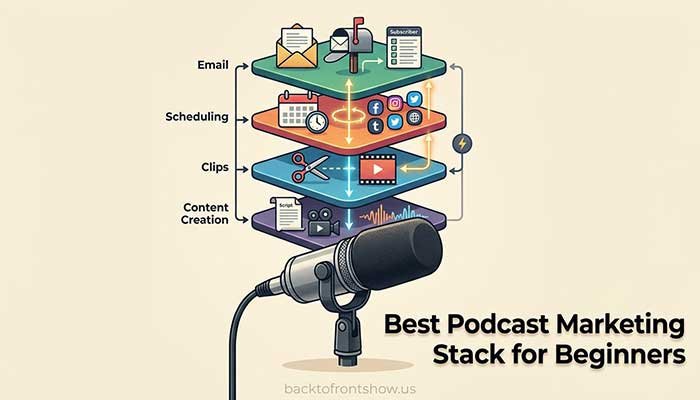
Best Podcast Marketing Stack for Beginners
Don’t start by buying five subscriptions.
A simple beginner stack could be:
Canva Free + Buffer Free + Headliner Free + Kit Free
That covers four important jobs:
- Create promotional graphics
- Create podcast clips
- Schedule social promotion
- Build an email audience
Once you identify the part of your process consuming the most time, upgrade that part.
For example, if a video podcast starts producing several clips every week, OpusClip may become worth paying for.
If your email list starts becoming a meaningful part of audience growth, Kit’s automation features may make sense.
If uploading content to six different networks becomes repetitive, Repurpose.io becomes easier to justify.
In my experience, buying tools before establishing a repeatable promotion routine is one of the easiest ways to waste a podcast budget. Software should improve an existing strategy, not substitute for one.
How to Build a Podcast Marketing Workflow
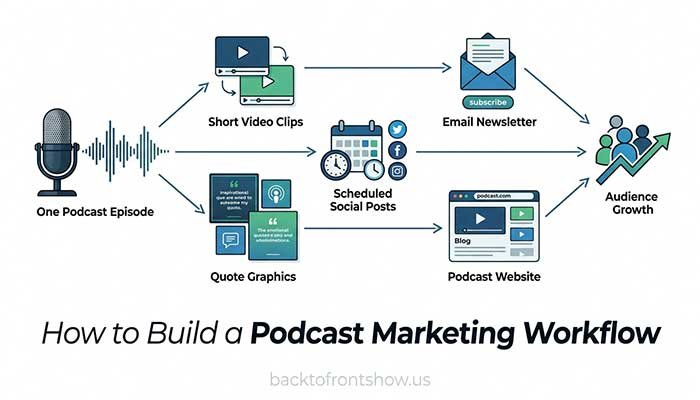
A useful podcast marketing platform doesn’t matter much unless you know what happens after you publish an episode.
Here’s a practical workflow.
Step 1: Publish the full episode
Make the complete episode available through your normal podcast hosting and distribution setup.
Step 2: Identify 3–5 promotable moments
Look for moments that:
- Answer a specific question
- Make a strong argument
- Tell a short story
- Contain a surprising observation
- Teach something useful
- Create curiosity about the full conversation
Don’t simply pick a section because it’s 45 seconds long.
Step 3: Create clips
Use Headliner for audio-driven content or a video clipping tool such as OpusClip for filmed podcasts.
Add captions because many people encounter social video before deciding whether to turn the sound on.
Step 4: Create supporting graphics
Use Canva to make quote cards, guest graphics, carousels or episode artwork.
Step 5: Schedule distribution
Load your promotional material into Buffer or another scheduler.
Spread your content across several days rather than publishing everything the moment the episode releases.
Step 6: Email your audience
Send subscribers the episode with a reason to listen.
Instead of:
“Episode 42 is live. Listen here.”
Try explaining what problem the episode addresses and what the listener will learn.
Step 7: Create a searchable episode page
Publish useful episode information on your website rather than relying only on podcast apps.
Step 8: Review what actually worked
Look at:
- Clip views
- Watch time
- Engagement
- Link clicks
- Email clicks
- Website visits
- Podcast downloads
- Follower growth
Don’t assume a high-view social clip automatically created podcast listeners.
The marketing metric closest to your actual goal matters more than vanity numbers.
What to Look for in Podcast Promotion Tools
Before paying for podcast marketing software, I would evaluate five things.
Does it solve a recurring problem?
Saving five minutes once isn’t particularly valuable.
Saving 30 minutes every episode for the next year may be.
Does it integrate with your current workflow?
A powerful product can still create more work if you constantly need to export, convert, download and re-upload files.
Can you measure the outcome?
Analytics don’t need to be sophisticated, but you should have some way to judge whether the software improves your process or results.
Can you use it consistently?
A tool you genuinely use every week is usually more valuable than one with 100 features you never touch.
Does the price still make sense as you grow?
Check whether pricing increases based on users, social channels, processing credits, subscribers or websites.
A cheap entry plan doesn’t always remain cheap.