The best podcast SEO tools depend on where you want people to find your show.
If your priority is ranking inside Apple Podcasts and Spotify, Ausha’s Podcast Search Optimization tools are among the most directly relevant options because they’re built specifically to track podcast search visibility.
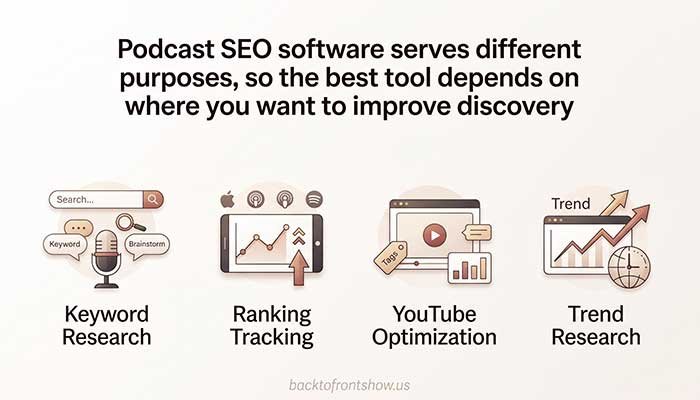
For broader keyword research, Semrush and Ahrefs offer much deeper search data. Google Keyword Planner, Google Trends, and AnswerThePublic are useful for finding topics and phrases potential listeners search for. And if YouTube is an important part of your podcast strategy, YouTube’s own discovery tools and metadata should be part of your workflow.
Here’s the quick comparison:
| Tool | Best For | Starting Price* | Podcast-Specific? |
|---|---|---|---|
| Ausha PSO | Apple Podcasts and Spotify search optimization | $29/month annually | Yes |
| Semrush | Advanced keyword research | $139/month monthly | No |
| Ahrefs | Keyword and competitor research | $29/month Starter | No |
| Google Keyword Planner | Free/low-cost keyword discovery | No separate tool fee | No |
| Google Trends | Finding rising topics | Free | No |
| AnswerThePublic | Questions and content ideas | $13.33/month annually | No |
| Apple Podcasts Search | Understanding Apple discoverability | Free | Yes |
| YouTube Podcast Tools | YouTube podcast discovery | Free | Yes |
*Pricing checked in October 2026. Software pricing and plan limits can change, so verify the current price before subscribing.
One thing I’ve learned from working with podcasting content is that buying an expensive SEO platform doesn’t automatically improve discoverability. The useful part is identifying what listeners are searching for, turning those topics into relevant episodes, and then optimizing your titles and descriptions without making them sound unnatural.
What Is a Podcast SEO Tool?
A podcast SEO tool helps you understand or improve how easily people can discover your show through search.
That can involve several different jobs:
- Finding topics and keywords people search for
- Tracking podcast rankings in Apple Podcasts or Spotify
- Optimizing episode titles and descriptions
- Researching competing podcasts
- Identifying questions listeners ask
- Finding trending subjects
- Improving YouTube search visibility
- Measuring whether your optimization efforts are working
This distinction matters because traditional SEO software usually measures Google search, while podcast-specific platforms may focus on searches occurring directly inside podcast apps.
For example, Apple says its podcast search results consider factors including show names, channel names, episode titles, popularity, and listener behavior. Ratings and reviews are not direct ranking factors in Apple Podcasts Search.
That means a Google keyword tool can give you useful topic ideas, but it cannot automatically tell you exactly where your podcast ranks when someone searches inside Apple Podcasts.
For serious podcast optimization, I prefer combining both types of information.
1. Ausha PSO — Best Overall for Podcast Search Optimization
Best for: Podcasters who specifically want to improve and track visibility in Apple Podcasts and Spotify.
Ausha is the most podcast-specific SEO platform in this list.
Its Podcast Search Optimization, or PSO, tools are designed around podcast search rather than conventional website SEO.
According to Ausha, its PSO Control Panel can monitor keyword rankings and overall visibility on Apple Podcasts and Spotify. It also provides information such as top-ranking keywords, ranking movement, competitors, and historical visibility.
Ausha also offers Live Search, which lets users investigate how podcasts rank for particular keywords and assess competing shows.
Key features
- Apple Podcasts keyword tracking
- Spotify keyword tracking
- Podcast visibility scores
- Competitor tracking
- Keyword popularity and competition indicators
- PSO Checker for titles and metadata
- Keyword ranking history
- Live Search on higher plans
- Works with podcasts hosted outside Ausha
Pricing
As of October 2026, Ausha lists its standalone PSO plans starting at:
- Starter: $29/month when billed annually or $35 monthly
- Grow: $59/month when billed annually or $69 monthly
- Enterprise: Custom pricing
The current pricing page lists 100 keywords for Starter and 500 for Grow, although limits and feature availability can change.
Check Ausha’s current PSO pricing
Pros
- Built specifically for podcast search
- Measures Apple Podcasts and Spotify visibility
- Tracks rankings rather than relying only on Google data
- Competitor tracking is useful for evaluating realistic keyword opportunities
- Compatible with different podcast hosts
Cons
- More expensive than free keyword research methods
- Primarily valuable if podcast-app search is a meaningful acquisition channel for you
- Some advanced features require higher plans
Who should use it?
I’d consider Ausha first if your main question is:
“What terms does my podcast rank for inside Apple Podcasts and Spotify, and are those rankings improving?”
Traditional SEO tools aren’t designed to answer that question as directly.
2. Semrush — Best for Advanced Podcast Keyword Research
Best for: Podcasters who also have a website, blog, YouTube presence, or larger content marketing strategy.
Semrush isn’t podcast-specific, but it provides much more comprehensive Google keyword research than most dedicated podcast tools.
Its Keyword Magic Tool can generate related keyword ideas, organize them into topic groups, show keyword difficulty, identify question-based searches, and provide search-volume information.
Semrush says its keyword database contains more than 28 billion keywords across 142 regional databases.
That makes it useful when you’re deciding which podcast subjects have broader search demand.
Imagine you run a personal finance podcast.
Instead of starting with a generic episode such as:
“Let’s Talk About Credit Cards”
keyword research might reveal more specific topics such as:
- how to pay off credit card debt
- balance transfer vs personal loan
- how many credit cards should I have
- does closing a credit card hurt credit
Those topics can become podcast episodes, YouTube videos, show notes, and website articles.
Key features
- Keyword Magic Tool
- Keyword search volume
- Keyword difficulty
- Search intent analysis
- Question-based keywords
- Competitor keyword research
- Position tracking
- Website SEO tools
- Search and AI visibility features
Pricing
Semrush currently lists its core SEO plan at $139 per month when paid monthly, or approximately $117.33 per month when billed annually.
View Semrush’s current pricing
Pros
- Huge keyword database
- Excellent for planning podcast topics around Google search demand
- Strong competitor research
- Useful if your podcast has a companion website
- Can support podcast, blog, and YouTube strategies together
Cons
- Expensive for a hobby podcast
- Doesn’t directly replace Apple Podcasts or Spotify ranking tracking
- Many features may be unnecessary if you only publish audio
Who should use it?
Semrush makes the most sense for creators who treat their podcast as part of a broader content business.
If you’re publishing podcast episodes, articles, landing pages, and YouTube content around the same subjects, the investment becomes much easier to justify.
3. Ahrefs — Best for Podcast SEO Plus Competitor Research
Best for: Podcasters building organic Google traffic around their show.
Ahrefs is another powerful traditional SEO platform that can support podcast keyword research.
Its Keywords Explorer is useful for researching demand around potential episode subjects. Site Explorer can also show which pages and topics generate organic traffic for competing websites.
That becomes valuable when competing podcasts maintain strong websites or publish detailed episode pages.
Key features
- Keywords Explorer
- Site Explorer
- Competitor analysis
- Rank Tracker
- Site Audit
- Search-volume data
- Keyword lists
- Search intent features on qualifying plans
Ahrefs currently offers a Starter plan for $29 per month that includes access to Keywords Explorer, Site Explorer, Site Audit, and Rank Tracker with lower usage limits. Its full Lite plan starts at $129 per month.
Pros
- Strong keyword and competitor research
- $29 Starter plan is more approachable than many full SEO suites
- Useful for researching podcast website opportunities
- Excellent if you also publish written content
Cons
- Podcast-app rankings aren’t its primary purpose
- Starter plan has significant usage limits
- Full plans can be expensive for small creators
Who should use it?
For a growing podcast with an active website, I’d seriously consider the $29 Starter tier before paying for a much larger SEO package.
It gives you enough information to make more informed content decisions without immediately committing to a $100+ monthly subscription.
4. Google Keyword Planner — Best Budget Keyword Research Tool
Best for: Beginners who want keyword ideas without buying professional SEO software.
Google Keyword Planner was primarily created for advertisers, but podcasters can still use it to research potential episode topics.
You can enter a keyword or website and get related keyword ideas.
Google says Keyword Planner can show:
- New keyword suggestions
- Estimated monthly searches
- Advertising cost information
- Keyword groupings
- Search forecasts
One limitation is that Google currently requires users to complete Google Ads account setup, including billing information, to access basic Keyword Planner functionality.
Read Google’s Keyword Planner guide
How podcasters can use it
Suppose you host a running podcast.
Start by entering broad topics such as:
- marathon training
- running shoes
- half marathon
- running nutrition
You can then look for more specific phrases that suggest clear listener problems.
Instead of an episode titled:
“Marathon Tips”
you might create:
“How to Fuel During a Marathon Without Upsetting Your Stomach”
The second title communicates a much more specific benefit.
Pros
- Useful keyword suggestions
- Google’s own search data
- Helpful for validating broad topic demand
- Location filtering can help US-focused podcasts
Cons
- Built for advertisers, not podcasters
- Search-volume information relates to Google, not Apple Podcasts
- Account setup is less convenient than dedicated SEO tools
Who should use it?
It’s a practical starting point if your budget is limited.
I wouldn’t assume that a high-volume Google keyword will automatically be a high-volume Apple Podcasts query, but Google data can still reveal the vocabulary and problems your potential listeners care about.
5. Google Trends — Best for Finding Trending Podcast Topics
Best for: Timely shows, news podcasts, sports podcasts, entertainment podcasts, and creators deciding between similar topics.
Google Trends serves a different purpose from traditional keyword research tools.
Rather than simply telling you that people search for a subject, it helps you understand how search interest changes over time.
This is especially useful for podcast topics where timing matters.
For example, imagine you’re choosing between two upcoming episode ideas:
- remote work productivity
- return-to-office policies
Google Trends can help you compare recent search interest and determine whether one subject is gaining attention.
Practical ways to use Google Trends
Use it to:
- Compare two potential episode subjects
- Identify seasonal topics
- Spot rapidly growing interest
- Avoid declining topics
- Compare interest by US state
- Plan episodes around recurring annual trends
Pros
- Free
- Simple to use
- Excellent for timing content
- Geographic comparisons are useful for US audiences
- Helps identify seasonality
Cons
- Doesn’t provide exact podcast search volume
- Relative interest scores can be misunderstood
- Not designed for podcast ranking tracking
Who should use it?
Almost every podcast can benefit from Google Trends occasionally.
I find it particularly useful as a second check after generating an episode idea. A topic may sound interesting, but Trends can show whether interest is currently rising, falling, or highly seasonal.
6. AnswerThePublic — Best for Listener Questions and Episode Ideas
Best for: Finding question-based podcast topics.
AnswerThePublic is useful when you’re struggling to turn a broad subject into specific episode ideas.
Enter a topic and the platform organizes related searches into questions, comparisons, prepositions, and other formats.
For a podcast about home buying, for example, you may uncover ideas around:
- when should I get preapproved for a mortgage
- can I buy a home with student loans
- renting vs buying
- how much house can I afford
These phrases can reveal problems worth addressing in an episode.
Pricing
As of October 2026, AnswerThePublic lists annual pricing starting at:
- Starter: $13.33/month, billed annually
- Growth: $66/month, billed annually
- Business: $132.66/month, billed annually
The Starter plan currently includes 100 searches per month along with search-volume and CPC information.
Pros
- Excellent for brainstorming questions
- Easy for beginners
- Useful for long-tail topics
- Can inspire episodes, show notes, FAQs, and social content
Cons
- Not a podcast ranking tracker
- Serious keyword researchers may get more value from a complete SEO suite
- Many suggestions still need manual evaluation
Who should use it?
Use AnswerThePublic when your biggest problem isn’t measuring rankings—it’s figuring out what listeners might actually want answered.
7. Apple Podcasts Search and Metadata — Best Free Apple Optimization Resource
Best for: Every podcast distributed through Apple Podcasts.
This isn’t conventional SEO software, but overlooking Apple’s own search system would be a mistake.
Apple publicly explains several factors its podcast search system considers.
According to Apple, important signals include:
- Show name
- Channel name
- Episode title
- Popularity
- User behavior after seeing search results
Apple also recommends using specific and distinctive show and episode titles.
Apple separately states that accurate podcast metadata helps shows appear in relevant searches.
Its creator guidance also encourages creators to include relevant keywords naturally in a show’s description so listeners can understand and find the show.
Read how Apple Podcasts Search works
Don’t ignore categories
Apple says creators can select a primary and secondary category, plus applicable subcategories.
The primary category can influence category pages, charts, and personalized recommendations, while relevant secondary categories can create additional opportunities for discovery.
Practical Apple Podcasts checklist
For each episode:
- Decide what specific problem or subject the episode covers.
- Put the topic into the title naturally.
- Make the title understandable without seeing the artwork.
- Write a useful description rather than stuffing keywords.
- Check whether your show’s categories remain accurate.
- Promote the episode so real listeners find and engage with it.
Pros
- Free
- Direct guidance from Apple
- Shows you which metadata Apple actually considers
- Relevant to any show on Apple Podcasts
Cons
- Not a conventional keyword research platform
- Doesn’t provide the keyword datasets of Semrush or Ahrefs
- You’ll need another tool if you want sophisticated rank monitoring
8. YouTube Podcast Tools — Best for Video Podcast SEO
Best for: Podcasts distributed on YouTube.
YouTube deserves separate attention because podcast discovery there behaves more like video search and recommendation than a traditional audio podcast directory.
YouTube’s official guidance recommends giving your podcast a detailed description because descriptions can help new viewers discover the show through search. It also recommends keeping the podcast’s name consistent rather than adding unnecessary words.
Read YouTube’s podcast discovery recommendations
For individual episodes, that makes topic selection and titling especially important.
A vague title such as:
“Episode 47 With Sarah”
gives a new viewer very little reason to click.
A clearer title might be:
“How to Start Freelancing Without Quitting Your Job | Sarah Jones”
The second version explains the value of the episode immediately.
Pros
- No separate podcast SEO subscription required
- Searchable podcast episodes
- Video and audio discovery opportunities
- YouTube analytics can provide additional audience signals
Cons
- Optimizing for YouTube isn’t identical to optimizing for Apple Podcasts
- Requires additional packaging, including thumbnails and video titles
- Competition can be high
Which Podcast SEO Tool Should You Choose?
You probably don’t need every tool in this list.
Choose based on your actual growth channel.
| Your Goal | Tool I’d Start With |
|---|---|
| Rank better in Apple Podcasts and Spotify | Ausha PSO |
| Research Google demand for podcast topics | Semrush |
| Get solid SEO research on a smaller budget | Ahrefs Starter |
| Find keyword ideas without buying an SEO suite | Google Keyword Planner |
| Identify rising and seasonal topics | Google Trends |
| Generate question-based episode ideas | AnswerThePublic |
| Improve Apple Podcasts metadata | Apple Podcasts creator resources |
| Grow a video podcast | YouTube + YouTube Studio |
For many independent podcasters, I’d start with the free options before adding paid software.
A practical beginner stack could be:
Google Trends + Google Keyword Planner + Apple Podcasts guidance + YouTube tools
Once your show has enough content and you’re actively trying to measure rankings, a podcast-specific tool such as Ausha becomes more useful.
If your podcast also supports a serious website and content marketing operation, Semrush or Ahrefs can make more sense.
Read More: Best Podcast Hosting Platforms for Beginners in 2026
How to Do Podcast Keyword Research Step by Step
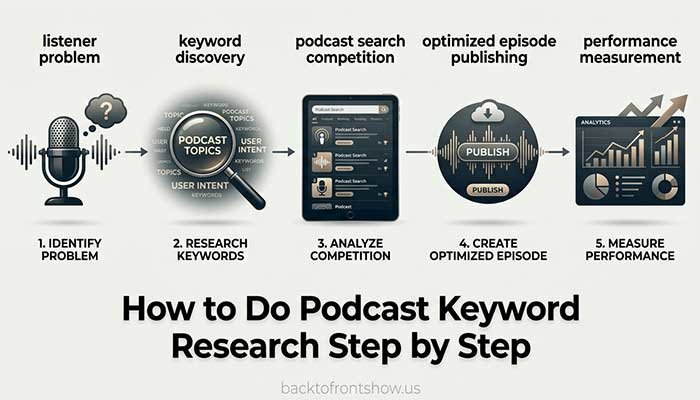
Tools become much more useful when you have a repeatable process.
Step 1: Start with your listener’s problem
Don’t begin by asking:
“What keyword should I rank for?”
Start with:
“What problem would make my ideal listener search for an episode?”
Imagine you host a podcast for new small-business owners.
Broad subjects might include:
- business taxes
- hiring employees
- business credit
- bookkeeping
- marketing
Step 2: Expand the topic
Use Google Keyword Planner, Semrush, Ahrefs, or AnswerThePublic to find more specific variations.
“Business credit” could expand into:
- how to build business credit
- business credit without personal guarantee
- business credit score
- business credit cards for new businesses
Now you have several focused episode opportunities rather than one vague subject.
Step 3: Check whether interest is stable
Run the main topic through Google Trends.
If interest is sharply declining, determine why.
If it’s seasonal, schedule the episode before demand peaks rather than afterward.
Step 4: Search the podcast platforms yourself
Type your target phrase into Apple Podcasts, Spotify, and YouTube.
Look at what already appears.
Ask:
- Are the results genuinely relevant?
- Are major established shows dominating?
- Are there weak results you could improve upon?
- What wording appears repeatedly?
- Does the same keyword mean something different on different platforms?
If you’re using a dedicated podcast SEO platform, this is where ranking and competitor data becomes especially useful.
Step 5: Create the episode around intent
Don’t simply mention a keyword in the title.
Actually answer the underlying question.
If your target phrase is:
“how to start a podcast with no audience”
the episode should genuinely explain how someone with no existing following can launch and attract their first listeners.
Step 6: Optimize the title naturally
Good:
How to Start a Podcast With No Audience: A Beginner’s Plan
Weak:
Podcast Tips Episode 29
Overoptimized:
How to Start a Podcast With No Audience | Start Podcast No Audience | Podcast Growth Tips
Clarity comes first.
Step 7: Write useful show notes
Explain what listeners will learn.
Use the main topic and related terminology where they naturally belong, but don’t turn the description into a list of repeated keywords.
Step 8: Measure results
Track:
- Podcast-app ranking changes
- Plays and downloads
- YouTube impressions
- YouTube search traffic
- Website impressions and clicks
- New followers
- Episode engagement
One mistake I’ve noticed is judging SEO entirely by downloads.
An episode can begin gaining search visibility before that visibility produces meaningful audience growth. Tracking rankings and discovery sources gives you more context.
Podcast SEO Tools Can’t Replace Good Content
This is probably the most important limitation to understand.
A keyword tool can tell you that thousands of people are interested in a subject.
It cannot make an unhelpful episode valuable.
Likewise, repeating a keyword throughout a title and description won’t automatically make a podcast rank.
Apple explicitly says popularity and user behavior are among the factors its search system considers.
So your strategy still needs to satisfy the person who clicks.
That means:
- Strong episode topics
- Clear titles
- Useful conversations
- Good audio
- Relevant guests
- Consistent publishing
- Effective promotion
- Accurate metadata
Podcast optimization works best when it helps the right listeners find content they already want.
Common Podcast SEO Mistakes to Avoid
Targeting keywords only because they have high search volume
A smaller, highly relevant phrase can be much more valuable than a massive keyword that doesn’t match your audience.
Treating Google search volume as podcast search volume
Google, Apple Podcasts, Spotify, and YouTube are different discovery environments.
Google keyword data is helpful for understanding demand, but don’t assume the same numbers apply inside podcast apps.
Stuffing keywords into episode titles
People still have to click your title.
Write for humans first.
Using vague episode names
Titles such as “Episode 19,” “Weekly Thoughts,” or “Conversation With Mike” provide almost no context to someone discovering you for the first time.
Ignoring podcast categories
Accurate categorization can help platforms understand your show and place it in relevant discovery surfaces.
Optimizing without measuring
If you change your strategy but never measure rankings, impressions, traffic, or listener acquisition, you won’t know whether your work helped.
Read More: Best Podcast Transcription Tools in 2026
My Recommended Podcast SEO Stack
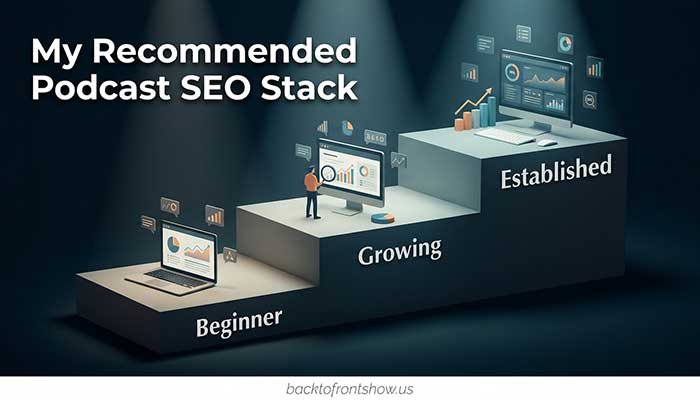
If I were building a podcast discoverability workflow from scratch, I wouldn’t immediately buy three expensive SEO platforms.
I’d use this progression:
Beginner
- Apple Podcasts creator guidance
- Google Trends
- Google Keyword Planner
- YouTube Studio if publishing video
Cost: Potentially $0 in dedicated SEO subscriptions.
Growing podcast
Add:
- AnswerThePublic or Ahrefs Starter
- A podcast-specific rank tracker if search optimization is becoming important
Established podcast or content business
Consider:
- Ausha PSO for podcast search tracking
- Semrush or a higher Ahrefs plan for wider organic-search research
- YouTube analytics for video discovery
- Website analytics and Search Console for Google performance
In my experience, this gradual approach is more practical than paying for advanced software before you have enough episodes or traffic to use the data properly.
Final Verdict
For podcast-specific search optimization, Ausha PSO is my strongest choice because it directly focuses on podcast visibility and keyword rankings in Apple Podcasts and Spotify.
For overall keyword research, Semrush offers more depth, while Ahrefs Starter provides a more approachable entry point for creators who don’t need a full enterprise-level SEO toolkit.
For beginners, you can accomplish a surprising amount with Google Trends, Google Keyword Planner, Apple Podcasts’ own creator guidance, and YouTube’s podcast discovery tools.
The most effective podcast SEO setup isn’t necessarily the one with the most software.
It’s the one that helps you consistently answer three questions:
- What is my audience searching for?
- Can I create a genuinely useful episode around that topic?
- Is my podcast becoming easier to find after I publish it?
If a tool helps you answer those questions, it’s useful. If it only gives you more dashboards to check, it probably isn’t.