For most podcasters, the Shure MV7+ is the best podcast microphone overall because it combines a dynamic capsule with USB-C and XLR connections, headphone monitoring, useful onboard processing, and a design that works well in typical home recording spaces.
You don’t need to spend that much to make a good podcast, though.
The Audio-Technica ATR2100x-USB and Samson Q2U are easier starting points for beginners, while the RØDE PodMic USB offers an excellent middle ground between affordability and long-term flexibility. If you’re building a higher-end XLR studio, the Shure SM7B remains a strong option—but it requires more supporting equipment.
Here’s the short version.
| Podcast microphone | Best for | Type | Connection | My take |
|---|---|---|---|---|
| Shure MV7+ | Best overall | Dynamic | USB-C + XLR | Best balance for most serious podcasters |
| RØDE PodMic USB | Best value upgrade | Dynamic | USB-C + XLR | Excellent long-term podcast mic |
| Audio-Technica ATR2100x-USB | Best for beginners | Dynamic | USB-C + XLR | Affordable and easy to grow with |
| Samson Q2U | Best budget option | Dynamic | USB + XLR | Simple, practical starter package |
| Audio-Technica AT2040USB | Best for noisy rooms | Dynamic | USB-C | Focused pickup for home studios |
| RØDE NT-USB+ | Best condenser USB mic | Condenser | USB-C | Detailed sound in a quiet room |
| Logitech G Yeti 2 | Best multi-pattern USB mic | Multi-pattern USB | USB-C | Flexible for creators using one mic |
| Shure SM7B | Best premium XLR mic | Dynamic | XLR | Excellent, but needs more equipment |
One important point: the most expensive microphone isn’t automatically the best microphone for your podcast. Your room, recording technique, microphone position, and audio interface can matter just as much.
In my experience, beginners often focus too much on specifications and not enough on how the microphone will actually be used. A $100 dynamic mic placed correctly can produce a much cleaner podcast recording than an expensive studio condenser sitting three feet away in an echoey bedroom.
Prices also change frequently, so I recommend checking current US pricing before buying rather than choosing solely from a fixed price quoted in an article.
1. Shure MV7+ — Best Podcast Microphone Overall
Best for: Solo podcasters, interviewers, streamers, and creators who want one microphone that can work now and after a future studio upgrade.
The Shure MV7+ is my first recommendation for most podcasters who have enough budget to move beyond an entry-level microphone.
It’s a dynamic cardioid microphone with both USB-C and XLR outputs. That combination matters because you can connect it directly to a laptop today and later move to an audio interface, mixer, or podcast production console without replacing the microphone.
Shure also includes a 3.5mm headphone output for direct monitoring.
Through USB, the MV7+ supports features including Auto Level Mode, a real-time denoiser, Digital Popper Stopper, compression, limiting, a high-pass filter, and other processing through Shure’s MOTIV software. Its digital connection supports up to 24-bit/48 kHz audio.
Shure’s own podcasting guidance lists the MV7+ as a hybrid USB/XLR microphone intended for podcasters who want flexibility and broadcast-style sound.
Why I like it for podcasting
A dynamic microphone is usually a practical choice when you’re recording in a bedroom, office, or untreated home studio. You still need good microphone placement, but you generally don’t have to fight room sound as much as you might with a sensitive condenser microphone.
The MV7+ also removes one of the biggest barriers for beginners: you don’t need to purchase an audio interface immediately.
Start with USB. Add XLR equipment later if your show grows.
Pros
- USB-C and XLR connectivity
- Dynamic cardioid design
- Built-in headphone monitoring
- Useful automatic gain and processing features
- Works with computers and compatible mobile devices
- Easy upgrade path from USB to XLR
- All-metal construction
Cons
- Costs considerably more than entry-level podcast microphones
- Some software features only apply when using the digital connection
- You still need proper mic technique for the best sound
Who should buy it?
I’d recommend the MV7+ to someone who expects to podcast consistently and doesn’t want to replace their microphone when upgrading the rest of their setup.
2. RØDE PodMic USB — Best Value for a Serious Podcast Setup
Best for: Podcasters who want broadcast-style sound and both USB and XLR connections without moving straight into premium studio gear.
The RØDE PodMic USB follows the same useful hybrid concept as the MV7+: connect it directly to your computer through USB-C or use the XLR output with an audio interface or mixer.
It’s a dynamic cardioid microphone built specifically around speech applications such as podcasting, streaming, and voice-over work.
The USB connection includes RØDE’s internal preamp and digital processing, while a built-in 3.5mm output provides zero-latency headphone monitoring. RØDE also includes an internal pop filter and shock mounting, plus an external pop filter.
The digital system records at 24-bit/48 kHz.
Why it’s a strong podcast mic
I like microphones such as the PodMic USB because they don’t force a beginner to decide between USB and XLR before they’ve even recorded their first episode.
Plug it into a computer and start recording.
If you later add a RØDECaster, mixer, or standard audio interface, switch to XLR.
That gives the microphone a longer useful life.
Pros
- USB-C and XLR
- Dynamic cardioid capsule
- Headphone monitoring
- Built-in digital processing
- Internal pop filtering and shock mounting
- Rugged metal construction
- Compatible with computers and mobile devices
Cons
- Heavier than many beginner microphones
- A proper stand or boom arm should be included in your total setup budget
- Some advanced features depend on RØDE software and USB operation
Who should buy it?
The PodMic USB is particularly appealing if you want a serious podcast mic but can’t justify moving immediately into a more expensive microphone and interface combination.
3. Audio-Technica ATR2100x-USB — Best Beginner Podcast Microphone
Best for: New podcasters who want an affordable microphone that won’t immediately limit future upgrades.
The Audio-Technica ATR2100x-USB is one of the easiest microphones to recommend to a first-time podcaster.
It’s a dynamic cardioid microphone offering both USB-C and XLR output, plus a headphone jack for direct monitoring.
Audio-Technica specifies recording resolutions up to 24-bit/192 kHz through USB. The package also includes USB-C-to-USB-C, USB-C-to-USB-A, and XLR cables along with a small desktop stand.
That makes it unusually complete for a beginner setup.
Why it’s good for beginners
When someone is starting a podcast, I usually recommend keeping the equipment chain simple.
You need:
- A microphone
- Headphones
- A computer
- Recording software
- A reasonably quiet room
You don’t necessarily need an interface, mixer, signal booster, expensive boom arm, and complicated processing chain on day one.
The ATR2100x lets you start through USB while keeping XLR available later.
Pros
- USB-C and XLR
- Dynamic cardioid design
- Headphone monitoring
- High-resolution USB recording support
- Multiple cables included
- Small desktop stand included
- Easy future upgrade path
Cons
- Included desk stands aren’t ideal for every desk
- Less software-based processing than some premium USB microphones
- Its handheld-style appearance may not suit every video podcast setup
Who should buy it?
If you’re starting your first podcast and want to spend carefully, this is one of the most sensible places to begin.
4. Samson Q2U — Best Budget Podcast Mic
Best for: Beginners who want an inexpensive USB/XLR microphone and useful accessories in the box.
The Samson Q2U has been popular with new podcasters for a simple reason: it provides most of what a beginner actually needs.
It’s a cardioid dynamic microphone with USB and XLR output. It also includes a headphone jack with level control for zero-latency monitoring.
Samson currently specifies up to 16-bit audio at 44.1 or 48 kHz and includes a microphone clip, tripod stand, extension, foam windscreen, USB cable, and XLR cable.
Those numbers may not look as impressive as microphones advertising 24-bit or extremely high sample rates, but don’t let specifications alone make the decision.
For spoken-word podcasting, room acoustics, microphone technique, recording levels, and editing usually have a much bigger practical impact than extreme sample-rate specifications.
Pros
- Generally budget-friendly
- USB and XLR
- Dynamic cardioid design
- Headphone monitoring
- Several accessories included
- Straightforward plug-and-play setup
Cons
- 16-bit USB recording rather than the 24-bit capability found on many newer models
- Less sophisticated onboard processing
- Entry-level stand may eventually be worth replacing
Who should buy it?
The Q2U makes sense if your priority is simply getting started without buying unnecessary gear.
5. Audio-Technica AT2040USB — Best Podcast Mic for a Noisy Room
Best for: Home podcasters dealing with computer fans, room noise, or less-than-ideal acoustics.
The Audio-Technica AT2040USB is different from most microphones on this list because it uses a hypercardioid pickup pattern rather than a standard cardioid pattern.
A hypercardioid microphone has a narrower area of strongest pickup. In practical terms, that can help keep the microphone focused on your voice when it’s positioned correctly.
Audio-Technica specifically designed the AT2040USB to reduce unwanted room sound and ambient noise. It also incorporates an internal pop filter, integrated shock mounting, headphone monitoring, a low-cut filter, mix control, and a touch-sensitive mute control.
It supports USB recording up to 24-bit/96 kHz.
The catch with hypercardioid microphones
A narrower pickup pattern can be useful, but placement becomes more important.
If you lean far away from the microphone or constantly move your head while recording, your level and tone can become less consistent.
That isn’t a defect. It’s simply part of using a more directional microphone.
Pros
- Dynamic microphone
- Highly directional hypercardioid pattern
- USB-C connectivity
- 24-bit/96 kHz support
- Built-in headphone monitoring
- Integrated shock mount
- Internal pop filtering
- Low-cut filter and mute button
Cons
- USB only; no XLR upgrade path
- More sensitive to changes in speaking position
- Less flexible than a USB/XLR hybrid microphone
Who should buy it?
Consider the AT2040USB if your main challenge is recording clear speech in a less-than-perfect room and you don’t expect to need an XLR connection later.
6. RØDE NT-USB+ — Best USB Condenser Microphone for Podcasting
Best for: Quiet home studios, podcasters who also record music, and creators who want detailed condenser sound.
So far, most of my recommendations have been dynamic microphones.
The RØDE NT-USB+ is different.
It’s a cardioid condenser USB microphone with a 20 Hz–20 kHz frequency range and 24-bit/48 kHz digital recording. It includes headphone monitoring and onboard processing that can be configured using RØDE software.
A condenser microphone can capture a detailed, open vocal sound. That same sensitivity is also why I’d be more careful about recommending one in an untreated bedroom.
It may capture things you didn’t intend to record:
- Reflections from bare walls
- Keyboard noise
- Air conditioning
- Traffic
- Other people elsewhere in the room
- Desk movement
When a condenser mic makes sense
If you’re recording in a quiet, controlled space, a condenser microphone can sound excellent.
The NT-USB+ is also more versatile than a speech-focused dynamic microphone if you expect to record acoustic instruments or singing.
Pros
- Detailed condenser sound
- USB-C plug-and-play setup
- Cardioid pickup pattern
- 24-bit/48 kHz recording
- Zero-latency headphone monitoring
- Onboard DSP through RØDE software
- Useful for speech and music
Cons
- No XLR output
- More likely to reveal poor room acoustics than a close-positioned dynamic mic
- Not my first choice for a noisy home office
Who should buy it?
I’d choose the NT-USB+ when the recording room is already reasonably quiet and the microphone will be used for more than spoken-word podcasting.
7. Logitech G Yeti 2 — Best Multi-Pattern USB Podcast Microphone
Best for: Creators who want USB simplicity and more than one pickup configuration.
The Logitech G Yeti 2 is the newer generation of the familiar Yeti concept.
It’s a plug-and-play USB-C microphone with multiple pickup options and software features including automatic adjustment and noise reduction. Logitech lists it at $159.99 on its US microphone page at the time of this update, although retail pricing and promotions can change.
The main reason to consider a multi-pattern microphone isn’t because more patterns automatically produce better audio.
It’s flexibility.
A single microphone can potentially be used differently depending on what you’re recording.
A warning for interview podcasts
Using one microphone between two people sounds convenient, but two separate close-positioned microphones are usually easier to control and edit.
For example, imagine two co-hosts sitting across a table.
With one centrally positioned microphone, room sound, differences in speaking volume, and speaker distance become harder to manage. With two microphones, each person’s track can be handled independently.
That’s why I wouldn’t buy a multi-pattern microphone solely as a way to avoid purchasing a second mic.
Pros
- USB-C simplicity
- Multiple pickup options
- Automatic audio-processing features
- No separate interface required
- Useful for podcasting, streaming, and general content creation
Cons
- USB-focused rather than a traditional XLR studio path
- One shared microphone isn’t ideal for most multi-host productions
- A sensitive desktop mic can still pick up room and desk noise
Who should buy it?
It’s a good fit for someone who wants a versatile USB microphone for podcasting as well as streaming, calls, and other content rather than a dedicated broadcast-style XLR setup.
8. Shure SM7B — Best Premium XLR Podcast Microphone
Best for: Dedicated studio setups where you already have—or are prepared to buy—a suitable interface and preamp.
The Shure SM7B is a professional dynamic XLR microphone widely used for speech and studio recording.
It has a cardioid pickup pattern, 50 Hz–20 kHz frequency response, internal shock isolation, electromagnetic shielding, bass rolloff, and presence controls.
But there’s one detail beginners need to understand before buying it.
The SM7B has a sensitivity rating of -59 dBV/Pa, meaning it produces a relatively low output level. Shure says voice-over setups should use a microphone preamp capable of at least about 60 dB of gain. Depending on your interface and how you record, additional clean gain may therefore be necessary.
Don’t budget only for the microphone
An SM7B setup may involve:
- The microphone
- An audio interface or mixer
- XLR cable
- A strong clean preamp or suitable interface
- Possibly an inline gain booster
- A sturdy microphone arm or stand
- Headphones
That’s why comparing only microphone prices can be misleading.
A USB/XLR hybrid mic may cost less as a complete podcast setup, even when its microphone price initially looks relatively high.
Pros
- Proven dynamic broadcast-style design
- Excellent build quality
- Useful internal shock isolation
- Strong electromagnetic shielding
- Replaceable windscreens
- Bass rolloff and presence controls
- Well suited to dedicated XLR studios
Cons
- XLR only
- No built-in USB
- No built-in headphone monitoring
- Requires substantial preamp gain
- Total setup cost can become expensive
Who should buy it?
I’d recommend the SM7B when you understand the rest of the audio chain and specifically want an XLR studio microphone.
I wouldn’t recommend it to a beginner simply because they’ve seen it in professional podcast studios.
USB vs XLR Podcast Microphones: Which Should You Buy?
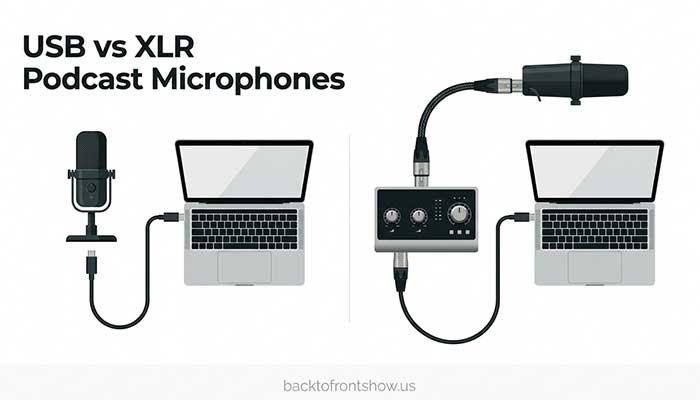
Choose a USB podcast microphone if:
- You’re recording alone
- You want the simplest setup possible
- You’re using a laptop or desktop computer
- You don’t want to buy an audio interface
- Portability matters
A USB microphone contains the electronics needed to convert your analog voice signal into digital audio.
Plug it into your computer, select it in your recording software, and you’re ready.
Choose an XLR podcast microphone if:
- You’re recording several people in the same room
- You want separate microphone inputs
- You already own an audio interface or mixer
- You want more control over the recording chain
- You’re building a dedicated studio
XLR becomes particularly useful for multi-person podcasts.
Instead of trying to connect several independent USB microphones to one computer—which can become awkward—you can plug several XLR microphones into an interface or podcast mixer designed for multichannel recording.
What about USB + XLR microphones?
For many beginners, this is the best compromise.
A microphone such as the MV7+, PodMic USB, ATR2100x-USB, or Q2U lets you start with USB while keeping XLR available later.
That’s one reason hybrid microphones appear so often in my recommendations.
Read More: Best Podcast Transcription Tools in 2026
Dynamic vs Condenser Microphones for Podcasting
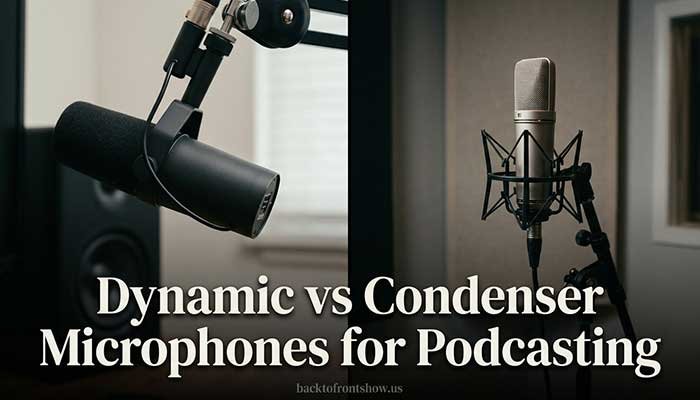
A common question is whether a dynamic or condenser microphone is better for podcasting.
For most home podcasters, I’d start with a dynamic microphone.
Not because dynamic microphones are automatically higher quality, but because their typical use suits close-up spoken-word recording very well.
Dynamic microphone
A dynamic podcast microphone is often the more practical choice when:
- Your room isn’t acoustically treated
- A computer is nearby
- You have traffic or household noise
- You record close to the microphone
- You want a traditional broadcast-style setup
Examples in this guide include the Shure MV7+, RØDE PodMic USB, ATR2100x-USB, Q2U, AT2040USB, and SM7B.
Condenser microphone
A condenser mic can be an excellent option when:
- Your room is quiet
- Acoustic reflections are controlled
- You want detailed vocal capture
- You also record music or instruments
- You understand microphone positioning
The RØDE NT-USB+ is a good example.
The important lesson is that condenser doesn’t mean professional and dynamic doesn’t mean basic. They’re different tools.
How to Choose the Best Podcast Mic
Instead of comparing microphones only by specifications, ask these questions.
1. Where will you record?
This is the first thing I’d consider.
A bedroom with bare walls, traffic outside, and a desktop PC is different from a treated recording booth.
For an untreated room, start by looking at dynamic cardioid microphones.
For a quiet studio, condenser options become more attractive.
2. How many people will record locally?
For one host, USB is easy.
For two, three, or four people recording in the same room, I’d generally prefer individual XLR microphones feeding a multichannel interface or podcast mixer.
Each person gets their own microphone and ideally their own track.
That makes editing significantly easier.
3. Do you plan to upgrade later?
If the answer is yes, a USB/XLR microphone can save money.
You don’t have to buy your future studio today.
Start via USB and add an interface when you actually need it.
4. Does the microphone have headphone monitoring?
Direct monitoring lets you hear what your microphone is capturing with little or no distracting delay.
It’s useful because you can immediately notice:
- You’re too far from the mic
- Your gain is too high
- You’re hitting the microphone
- Clothing or desk noise is getting recorded
- Your mouth position is causing plosives
For podcasting, I consider built-in monitoring a genuinely useful feature rather than a specification added for marketing.
5. What else do you need to buy?
The microphone price isn’t your complete budget.
Depending on the model, you may also need:
- Boom arm
- Desk stand
- XLR cable
- Audio interface
- Pop filter
- Shock mount
- Headphones
- Inline preamp or gain booster
Always compare the complete setup cost.
How Much Should You Spend on a Podcast Microphone?
You don’t need a $400+ microphone to launch a good podcast.
A practical way to think about budgets is:
| Budget level | What to prioritize |
|---|---|
| Entry level | Dynamic mic, USB connection, basic stand, headphone monitoring |
| Midrange | Better build, USB + XLR, better monitoring and software controls |
| Premium | Higher-end mic, interface/mixer, boom arm, room treatment, better monitoring |
For a first podcast, I would rather spend part of the budget improving the room and getting proper headphones than put everything into one expensive microphone.
A blanket, rug, curtains, bookshelves, upholstered furniture, and sensible mic positioning can sometimes improve a home recording more than another equipment upgrade.
Read More: Best Podcast SEO Tools: 8 Options for Better Discoverability
Podcast Microphone Placement Matters More Than Many Beginners Realize
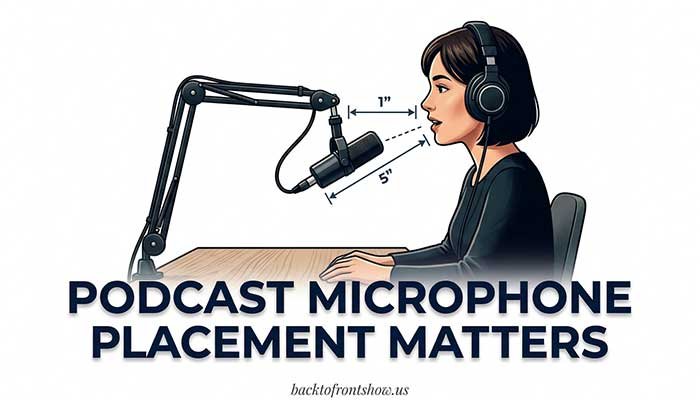
Buying a good microphone and then recording from two feet away is a common mistake.
For most dynamic podcast microphones, you’ll get a cleaner voice by keeping the mic relatively close and lowering the gain accordingly.
Shure’s SM7B guidance, for example, recommends speaking roughly 1 to 6 inches from the microphone, with distance also affecting bass response.
You don’t need to apply one exact distance to every microphone, but the general principle is useful.
A simple starting setup
- Place the microphone roughly a few inches from your mouth.
- Aim the correct side or end of the mic toward your voice.
- Move it slightly off-axis if plosives such as “P” and “B” sounds are excessive.
- Set recording gain so normal speech has comfortable headroom and doesn’t clip.
- Wear headphones and listen before recording a full episode.
- Record a 30-second test.
- Check it on headphones before continuing.
That 30-second test can save you from discovering an hour later that your entire episode has clipping, echo, or background noise.
Common Podcast Microphone Mistakes to Avoid
Buying a condenser mic for a very echoey room
A detailed microphone also records detailed room problems.
Fix the recording environment or choose a mic suited to it.
Putting the microphone too far away
Moving a microphone closer to your voice often improves the voice-to-room-noise ratio.
Increasing gain instead of moving closer
If your microphone is across the desk, simply turning up the gain also turns up unwanted sound.
Buying an SM7B without checking interface gain
The microphone is only one part of the signal chain.
Shure specifically notes the SM7B’s substantial preamp-gain requirements.
Using one mic for several people just to save money
It can work, but individual close microphones generally provide much more control.
Ignoring headphones
You should know what is actually being recorded—not what the room sounds like to your ears.
Which Podcast Microphone Should You Buy?
If you still aren’t sure, here’s how I’d narrow it down.
Choose the Shure MV7+ if you want the strongest all-around combination of simplicity, sound-focused features, and room to upgrade.
Choose the RØDE PodMic USB if you want a robust USB/XLR dynamic mic at a more value-focused level.
Choose the Audio-Technica ATR2100x-USB if you’re starting your first podcast and want an affordable mic you won’t immediately outgrow.
Choose the Samson Q2U if keeping startup costs low is the priority.
Choose the Audio-Technica AT2040USB if you’re recording in a noisy room and want highly focused USB voice capture.
Choose the RØDE NT-USB+ if you have a quiet room and prefer the detail of a condenser microphone.
Choose the Logitech G Yeti 2 if multi-pattern USB flexibility is more important than building an XLR studio.
Choose the Shure SM7B if you’re building a dedicated XLR recording chain and understand its preamp requirements.
For most new podcasters, I’d start with the ATR2100x-USB, Q2U, PodMic USB, or MV7+ rather than buying a complicated studio setup before recording the first episode.
Good podcast audio is less about owning the most impressive microphone and more about choosing the right microphone for your room, placing it properly, and recording consistently.