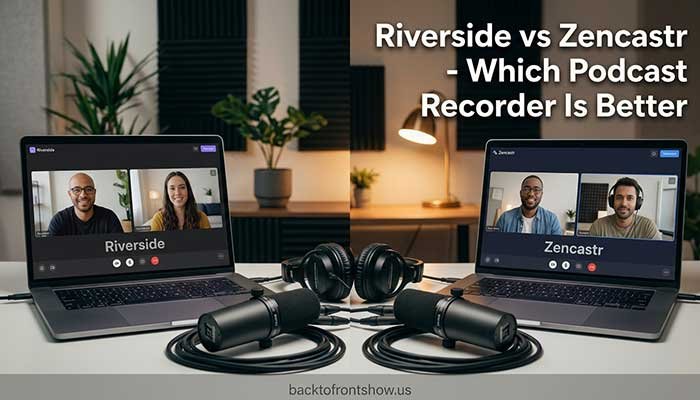
If you’re choosing between Riverside and Zencastr, Zencastr currently offers the better value for most budget-conscious podcasters, while Riverside is the stronger choice if you want a more developed video-production, livestreaming, webinar, and content-repurposing workflow.
Both platforms can record participants locally instead of relying entirely on the quality of the internet connection. Both support separate participant tracks, high-quality audio, 4K video in supported configurations, editing, transcription, and publishing tools.
The biggest difference in 2026 is pricing. Zencastr’s current Vibecastr plan is listed as free and includes unlimited separate audio and video recording, up to 4K video, 48 kHz WAV recording, unlimited track storage, transcription, and a large collection of production tools. Riverside has a free plan, but its highest recording quality—up to 4K video and 48 kHz audio—is part of its paid plans.
That doesn’t automatically make Zencastr better for everyone. Your decision should depend on how you produce your podcast, whether video is important, how many people you record with, and how much editing and distribution you want to do inside one platform.
Riverside vs Zencastr at a Glance
| Feature | Riverside | Zencastr |
|---|---|---|
| Local recording | Yes | Yes |
| Separate participant tracks | Yes | Yes |
| Maximum video quality | Up to 4K on paid plans | Up to 4K on current free Vibecastr plan |
| Maximum audio quality | Up to 48 kHz | Up to 48 kHz WAV |
| Free plan | Yes | Yes |
| Free-plan 4K recording | No | Yes, currently listed |
| Recording time | Unlimited recording; separate-track downloads have plan limits | Unlimited recording |
| Participants | Current Riverside Studio supports up to 100 recorded participants | Up to 6 participants |
| Browser recording | Yes | Yes |
| Mobile recording | Yes | iOS app |
| Separate-track editing | Yes | Yes |
| Text-based editing | Yes | Yes |
| Transcription | Yes | Yes |
| Podcast hosting/publishing | Yes | Yes |
| Livestreaming | Available, with advanced capabilities on higher plans | Yes |
| Best fit | Video-heavy creators, live content, webinars, larger productions | Podcasters wanting strong recording features at a very low cost |
Feature availability and plan details can change, so check both companies’ official pricing pages before subscribing.
Recording Quality: Riverside vs Zencastr
Recording quality is one area where you shouldn’t choose a platform based only on the words “HD” or “4K.”
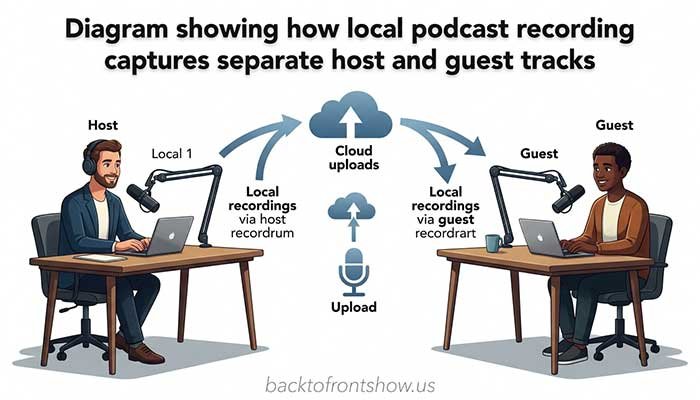
Both Riverside and Zencastr use local recording. This means each person’s high-quality audio and video is captured on their own device and uploaded rather than simply recording the compressed video call you see on screen.
That’s important when recording remote guests.
If your guest’s internet connection becomes unstable for a few seconds, the live conversation may look or sound choppy. But because the high-quality track is being recorded locally, poor network conditions don’t necessarily become permanently baked into the final track. Riverside describes its high-quality tracks as locally recorded and therefore not dependent on the participant’s live internet connection. Zencastr uses a similar local-recording approach.
Riverside Recording Quality
Riverside supports recording at up to 2160p 4K video and 48 kHz audio on eligible paid plans and compatible equipment. Separate participant tracks can be downloaded for further editing.
Its current free plan is more limited. Riverside lists:
- Up to 720p video
- 44.1 kHz audio
- Two hours of multi-track recording as a one-time allowance
- Riverside watermarking
- Unlimited single-track recording and editing
Its Pro plan increases recording quality to up to 4K video and 48 kHz audio and removes the watermark.
Zencastr Recording Quality
Zencastr currently offers:
- Up to 4K video
- 48 kHz WAV audio
- Local recording
- Separate participant tracks
- Progressive uploading
- Automatic cloud backups
These capabilities are currently listed on its free Vibecastr plan. Zencastr also says recordings can run without a time limit, with up to six participants in a session.
For someone primarily comparing raw specifications per dollar, that’s a major advantage for Zencastr.
Which Has Better Recording Quality?
It’s effectively a tie at the top end.
Both platforms can produce up to 4K video and 48 kHz audio under supported conditions.
Your microphone, camera, lighting, room acoustics, computer, and guest setup will usually have a greater effect on the final result than choosing between two platforms that are both capable of high-quality local recording.
One thing I’ve learned from working around podcasting content is that people often put too much weight on maximum resolution. A well-lit 1080p video with a good microphone can look and sound far more professional than poorly lit 4K footage recorded through a laptop microphone.
Choose the workflow that helps you consistently get good recordings rather than chasing the largest resolution number.
Recording quality winner: Tie
Value for high-quality recording: Zencastr
Riverside Pricing vs Zencastr Pricing
Pricing is currently one of the biggest differences between these platforms.
Riverside Pricing
As of October 2026, Riverside’s official pricing page lists these main creator plans:
| Riverside Plan | Price When Billed Annually | Key Positioning |
|---|---|---|
| Free | $0 | Basic recording and editing |
| Pro | $24/month ($288 annually) | 4K/48 kHz production |
| Grow | $34/month ($408 annually) | Growth and livestreaming tools |
| Webinar | $79/month on annual billing | Webinar production |
| Business | Custom | Organizations and larger teams |
Monthly billing is higher. Riverside currently lists Pro at $29/month and Grow at $39/month when not using the annual discount.
Riverside also limits separate-track download hours by plan. Its pricing page currently lists 15 hours per month for Pro, 20 hours for Grow, and 25 hours for Webinar. Recording can continue after the allowance is reached, but downloading additional individual high-quality tracks is restricted until the allowance resets or the account is upgraded.
Zencastr Pricing
Zencastr’s current pricing page is unusually aggressive.
Its Vibecastr plan is listed at $0 and currently includes features such as:
- Six recording participants
- Unlimited separate audio and video recording
- Up to 4K video
- 48 kHz WAV recording
- Local recording
- Unlimited track storage
- Unlimited separate-track recording
- Transcription
- Text-based and multi-track editing
- Podcast hosting and publishing
- Advanced podcast analytics
- Livestreaming
Zencastr also offers custom Enterprise arrangements.
Zencastr announced this expanded free offering in August 2026. The company specifically said the new Vibecastr tier includes free 4K video recording, 48 kHz audio, hosting, transcription, episodes, clips, analytics, and distribution. It also stated that unlimited production credits were available for a limited time, so don’t assume every AI-related allowance currently shown will remain unlimited indefinitely.
Which Is Cheaper?
At the moment, Zencastr wins clearly on price for an individual podcaster who mainly needs remote recording and production tools.
Riverside makes more sense financially when the additional Riverside workflow, live-production capabilities, or other features justify the subscription for you.
Pricing winner: Zencastr
Participant Limits
This difference can immediately eliminate one option for certain productions.
Zencastr currently supports up to six people in a recording, including the host. Each participant receives a separate track.
Riverside’s newly rebuilt Studio documentation says it can support up to 100 recorded participants in one session, with each participant receiving an individual track. Up to nine people are displayed on screen at once depending on the layout.
Most normal interview podcasts won’t come close to either limit. But the difference matters for:
- Panel discussions
- Roundtables
- Training content
- Company events
- Multi-speaker productions
- Large remote recordings
If your show normally consists of one host and one or two guests, participant limits shouldn’t drive your decision.
Participant-capacity winner: Riverside
Guest Experience
Neither platform requires a traditional complicated remote studio setup.
Riverside lets hosts send participants a studio invitation link, and guests can join without creating a Riverside account.
Zencastr works similarly. Guests can join through an invitation link without creating an account or downloading desktop software when using a supported computer browser.
This matters more than it sounds.
If you interview executives, customers, authors, experts, or occasional guests who aren’t experienced podcasters, every additional login and installation step creates another opportunity for something to go wrong.
For typical desktop guests, both platforms keep the process reasonably simple.
Guest experience: Tie
Editing and AI Features
Modern podcast recorders aren’t just recording tools anymore.
Both Riverside and Zencastr are moving toward an all-in-one workflow where you can record an episode, generate a transcript, edit it, create short clips, improve audio, and prepare content for distribution without switching applications constantly.
Riverside Editing
Riverside’s paid plans include text-based editing and tools such as:
- Automatic transcription
- Magic Clips
- Audio enhancement
- AI B-roll
- Eye-contact correction
- Silence removal
- Filler-word removal
- Show notes
- Animated or styled content features
Riverside can combine the participants’ separate tracks into an editable project, after which you can trim and export audio or video. Exports can reach 4K when the underlying media supports it.
Zencastr Editing
Zencastr’s current feature set includes:
- Text-based editing
- Multi-track editing
- Automatic transcription
- Background-noise removal
- Audio-level normalization
- Filler-word removal
- Long-pause removal
- Animated captions
- AI layouts
- Eye-contact correction
- Face-centering correction
- Chapter generation
- Title and description generation
Its current Vibecastr plan lists many of these tools without a subscription charge, although AI and production allowances are especially worth rechecking because Zencastr has said some unlimited production credits are promotional.
Which Editor Is Better?
For someone who wants a polished video-content workflow and plans to turn long recordings into clips and other visual assets regularly, I’d lean toward Riverside.
For someone focused on getting a surprisingly complete recording-and-editing package without adding another monthly expense, Zencastr is hard to ignore.
Editing winner: Riverside for workflow; Zencastr for value
Podcast Hosting and Distribution
You don’t necessarily need a separate podcast host with either platform.
Riverside’s paid creator plans include podcast hosting and analytics, along with options for publishing content to destinations including YouTube, Spotify, Apple Podcasts, Instagram, and LinkedIn.
Zencastr’s Vibecastr plan currently lists unlimited audio and video hosting, distribution to major podcast platforms, an embeddable player, analytics, and multi-platform publishing tools.
That makes both tools much broader than simple remote recording applications.
However, I wouldn’t move an established podcast’s hosting setup solely because a recorder happens to include free hosting. Consider your analytics history, RSS feed, monetization setup, integrations, and migration risk before making that decision.
Mobile Recording
Riverside supports recording through its mobile app, and its documentation says compatible mobile devices can participate in recordings at up to 4K when the hardware and plan support it.
Zencastr offers an iOS app for iPhone and iPad. As of its current documentation, Android phones and tablets aren’t supported for recording, and Zencastr recommends using the iOS app rather than a mobile browser for mobile recording.
That’s an important limitation if you frequently work with guests who might join from Android devices.
Mobile flexibility winner: Riverside
Livestreaming and Webinars
Riverside becomes more attractive when your production extends beyond a normal recorded podcast.
Its Grow plan includes 1080p livestreaming, multistreaming to multiple destinations, custom RTMP, saved scenes and layouts, audience-management tools, and other live-production features. Riverside also offers a Webinar plan with registration, Q&A, polls, email reminders, lead capture, and webinar analytics.
Zencastr also includes livestreaming and can stream to major platforms, so you don’t necessarily need Riverside just to go live.
But Riverside has a clearer product path for creators and businesses that want to move from podcast interviews into more structured livestreams, webinars, audience events, and larger productions.
Live production winner: Riverside
Read More: Buzzsprout vs Podbean: Which Is Better?
Riverside Pros and Cons
Pros
- Up to 4K video and 48 kHz audio on eligible plans
- Local recording protects high-quality tracks from many internet-related problems
- Separate audio and video tracks
- Strong video editing and repurposing workflow
- Mobile recording
- Large participant capacity in the current Studio
- Livestreaming and multistreaming options
- Dedicated webinar features
- Built-in hosting and publishing
- Useful option for video-first podcasts and content teams
Cons
- 4K and 48 kHz recording require a paid plan
- Free plan is substantially more limited than Zencastr’s current free offering
- Separate-track download hours are capped on creator plans
- Some advanced features require higher-priced plans
- May provide more tools than an audio-only podcaster actually needs
Zencastr Pros and Cons
Pros
- Current Vibecastr plan is free
- Up to 4K video and 48 kHz WAV recording
- Unlimited recording
- Local recording
- Separate participant tracks
- Automatic cloud backups
- Text-based and multi-track editing
- Transcription and AI-assisted production tools
- Hosting, analytics, and distribution tools
- Excellent feature-to-price ratio
Cons
- Maximum of six recording participants
- Mobile recording currently centers on iPhone/iPad rather than Android
- Some current AI/production allowances may change after promotional periods
- Larger organizations requiring custom workflows may need Enterprise
- Creators focused heavily on webinars and sophisticated live production may prefer Riverside
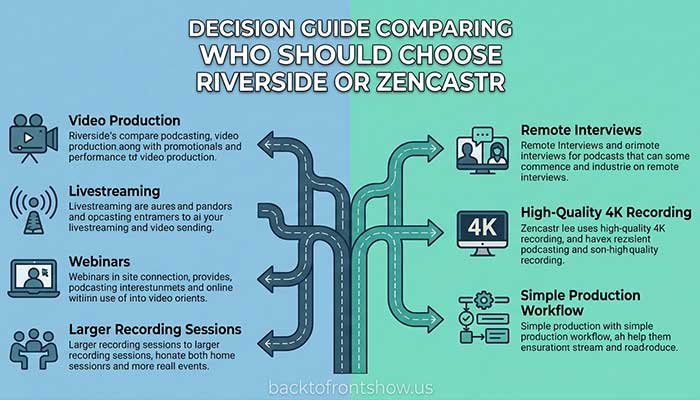
Who Should Choose Riverside?
Choose Riverside if:
- Video podcasting is a major part of your content strategy.
- You regularly repurpose interviews into YouTube videos and social clips.
- You want livestreaming and podcast recording in the same workflow.
- You need webinar features.
- You may record large panels or sessions with more than six people.
- Your guests need flexible mobile options.
- You’re comfortable paying for a production-focused platform.
- You value an integrated video editing and publishing workflow more than getting the lowest price.
For a business podcast that records interviews, produces YouTube episodes, cuts multiple social clips, runs live sessions, and occasionally hosts webinars, Riverside is the more natural fit.
Read More: Best Podcast Microphones in 2026: 8 Great Mics for Every Budget
Who Should Choose Zencastr?
Choose Zencastr if:
- You want to minimize software costs.
- You mainly record remote podcast interviews.
- Six participants per session is enough.
- You want 4K video and 48 kHz WAV without paying for Riverside Pro.
- You want separate tracks and local recording.
- You want editing, transcription, hosting, and distribution in one platform.
- You don’t depend on Android mobile recording.
- You don’t need Riverside’s more extensive webinar workflow.
Imagine you’re launching a weekly interview podcast with one host and one guest. You want separate WAV files for editing and may eventually publish video to YouTube.
For that type of show, the current Zencastr free offering could cover most of your core production needs without adding a monthly recording-software bill.
Riverside vs Zencastr: Final Verdict
For most independent podcasters comparing pure value in 2026, I’d start with Zencastr.
Its current free Vibecastr plan offers an unusually strong package: local recording, separate tracks, up to 4K video, 48 kHz WAV audio, transcription, editing, hosting, and distribution. That’s difficult for a paid recording platform to beat purely on price.
Riverside is still the better choice for creators whose podcast is part of a larger video-production operation. Its editing workflow, mobile flexibility, large recording capacity, livestreaming, multistreaming, webinar capabilities, and higher-end business tools make it particularly attractive to video-first creators, marketing teams, and organizations.
My practical recommendation is simple:
Start with Zencastr if you mainly need a high-quality remote podcast recorder and want the best value. Choose Riverside if video production, live content, webinars, or a more advanced creator workflow justify the subscription.
And don’t choose based on 4K alone. A good microphone, headphones, quiet room, reliable computer, sensible lighting, and prepared guests will improve your podcast far more than switching between two platforms that are both technically capable of professional-quality recordings.