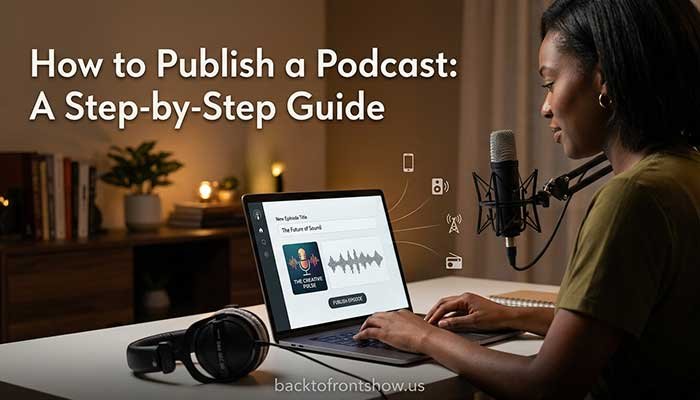
Creating a podcast is simpler than it may look from the outside. At the most basic level, you need to choose a topic, decide on a format, record your audio, edit it, upload it to a podcast host, and distribute it to listening platforms.
You don’t need a professional studio or thousands of dollars in equipment.
For a beginner, a quiet room, a decent microphone, headphones, recording software, and a podcast hosting account can be enough to launch a good-quality show.
The harder part is usually not the technology. It’s creating a podcast that has a clear purpose and that you can realistically continue producing.
With 2+ years of experience working in this space, one thing I’ve learned is that beginners can spend too much time thinking about microphones, software, and logos before answering the most important question: Why would someone want to listen to this show?
This guide walks you through how to create your own podcast step by step, from the initial idea to publishing and promoting your first episodes.
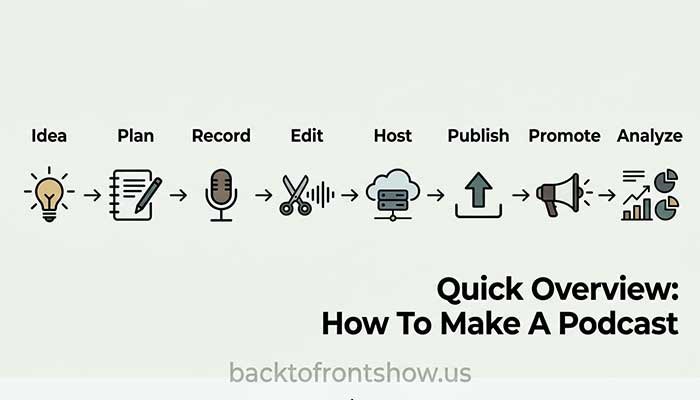
Quick Overview: How To Make A Podcast
Here is the entire process at a glance:
| Step | What You Need to Do |
|---|---|
| 1 | Choose your podcast topic and target listener |
| 2 | Decide on your format |
| 3 | Choose a podcast name |
| 4 | Plan your first episodes |
| 5 | Get your recording equipment |
| 6 | Set up your recording environment |
| 7 | Record your first episode |
| 8 | Edit and export the audio |
| 9 | Create podcast cover art |
| 10 | Choose a podcast hosting platform |
| 11 | Upload and publish your podcast |
| 12 | Submit it to podcast directories |
| 13 | Launch and promote the show |
| 14 | Review performance and improve |
You can complete many of these steps with free or inexpensive tools.
Let’s go through each one.
Step 1: Choose a Clear Podcast Topic
Your first decision is what your podcast will actually be about.
A good topic sits somewhere between:
- Something you understand or want to explore
- Something you can discuss repeatedly
- Something a specific group of people wants to hear about
Avoid choosing a subject so broad that listeners can’t immediately understand what your show offers.
For example:
Too broad:
“Business”
More focused:
“Marketing strategies for local service businesses”
Or:
Too broad:
“Fitness”
More focused:
“Strength training for busy adults over 40”
The second version gives a potential listener a much clearer reason to subscribe.
Define Your Target Listener
Try describing one typical listener.
Ask:
- Who are they?
- What are they interested in?
- What problem are they trying to solve?
- Why would they choose your podcast?
- What other podcasts, YouTube channels, or media might they follow?
Imagine you’re creating a podcast about personal finance for first-time professionals in the United States.
Your target listener might be someone in their 20s who wants straightforward explanations of budgeting, credit cards, student loans, investing, and workplace benefits.
That gives you much more direction than simply creating “a money podcast.”
Make Sure You Have Enough Episode Ideas
Before committing to a topic, write down at least 15–20 possible episode ideas.
If that’s extremely difficult, the topic may be too narrow—or you may not yet have a clear enough angle.
I usually recommend doing this before buying equipment. A list of future episodes gives you an early indication of whether the concept has enough depth to become a real show.
Step 2: Choose Your Podcast Format
There is no single correct podcast format.
Common formats include:
Solo Podcast
One host speaks directly to the audience.
This can work well for:
- Tutorials
- Commentary
- Education
- News analysis
- Personal expertise
The main advantage is control. You don’t need to coordinate with guests or another host.
The challenge is keeping a solo episode engaging without another person contributing to the conversation.
Interview Podcast
A host interviews a different guest in each episode.
This format is useful when your show’s value comes partly from bringing different perspectives and expertise to the audience.
The downside is scheduling and maintaining a reliable guest pipeline.
Co-hosted Podcast
Two or more regular hosts discuss the topic together.
Natural chemistry can make these shows engaging, but the hosts need dependable schedules and a clear understanding of their roles.
Narrative or Documentary Podcast
These shows often combine narration, interviews, sound design, research, and storytelling.
They can be excellent, but they’re usually more time-consuming to produce.
Hybrid Podcast
You don’t have to use the same format every week.
For example, you could publish mostly solo episodes while occasionally interviewing guests.
That’s often a practical option for beginners.
Step 3: Decide How Long and How Often You’ll Publish
Don’t choose an episode length because you think podcasts are “supposed” to be a certain length.
Choose the length required to deliver the episode properly.
A focused 15-minute episode can be more useful than a repetitive 60-minute conversation.
Your publishing schedule should also be realistic.
You might choose:
- Weekly
- Every two weeks
- Monthly
- Seasonal releases
A weekly schedule sounds attractive, but it can become difficult if each episode requires several hours of research, recording, editing, and promotion.
I’d rather see a beginner publish a solid episode every two weeks consistently than promise a weekly show and stop after six episodes.
Step 4: Choose a Podcast Name
Your podcast name should be easy to understand, pronounce, remember, and search for.
Before choosing one, check whether the same or a confusingly similar podcast already exists.
A good podcast name normally does at least one of these things:
- Explains the subject
- Communicates the personality of the show
- Creates curiosity
- Builds around an existing person or brand
Avoid names that require a long explanation.
You should also think about whether the name gives you enough room to grow.
For example, naming a show around one highly specific product could become restrictive if you eventually want to cover a broader topic.
Step 5: Plan Your First Episodes
Don’t launch with only one vague episode idea.
Create a small content plan first.
For each episode, write down:
- Working title
- Main topic
- What the listener should learn
- Main talking points
- Examples or stories you may use
- Call to action
- Possible guest, if applicable
Script or Outline?
You don’t necessarily need to write every word.
For many beginners, a structured outline sounds more natural.
A basic episode outline could look like this:
- Short opening
- Explain the problem
- Main point #1
- Main point #2
- Main point #3
- Practical example
- Summary
- Call to action
Full scripts can be useful for tightly produced educational or narrative podcasts, but reading a script without practice can sound stiff.
Experiment until you find the right balance.
Step 6: Get Your Podcast Equipment
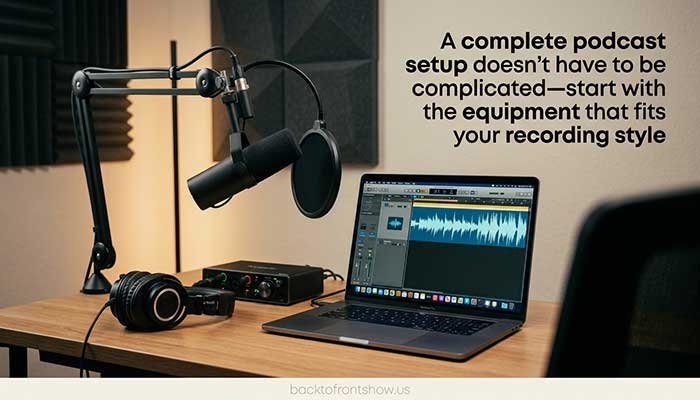
Your podcast setup doesn’t need to be complicated.
For a basic audio podcast, you’ll typically need:
- Microphone
- Headphones
- Computer or compatible recording device
- Recording software
- Optional microphone stand or boom arm
- Optional pop filter or windscreen
USB Microphone vs. XLR Microphone
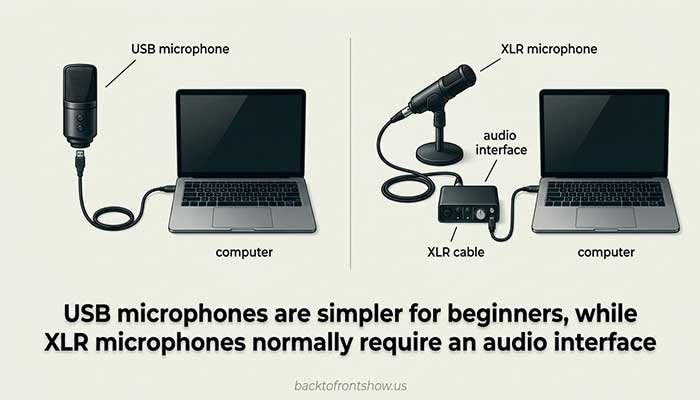
A USB microphone connects directly to your computer.
For most beginners, that’s the easiest option.
An XLR microphone normally connects to an audio interface, which then connects to your computer.
XLR setups provide more flexibility, particularly if you’re recording multiple microphones, but they introduce additional equipment and setup.
Audacity’s current documentation confirms that USB microphones can connect directly to a computer, while XLR microphones require an audio interface.
Do You Need Expensive Equipment?
No.
Room acoustics and microphone technique can matter as much as spending more money on a microphone.
A reasonably priced microphone in a quiet, soft-furnished room can produce better results than an expensive microphone in an echo-filled kitchen.
For beginners, I recommend improving the recording environment before assuming every audio problem requires new hardware.
Use Headphones
Headphones are especially important when recording remote guests or monitoring yourself.
They help prevent audio from your speakers from feeding back into the microphone.
Audacity also recommends using headphones for monitoring rather than speakers to avoid feedback and sound bleeding into the recording.
Step 7: Prepare Your Recording Space
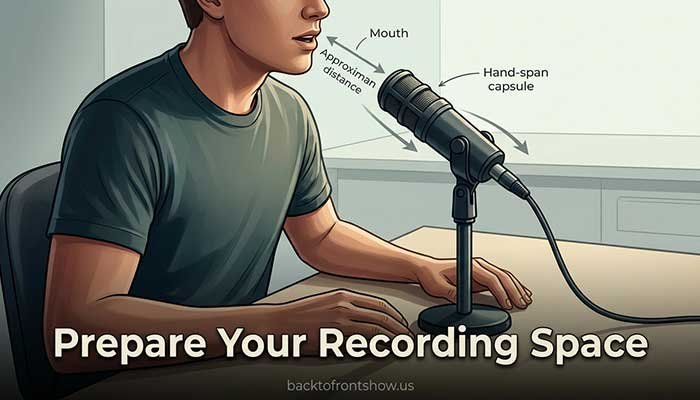
You don’t need a commercial recording studio.
You do need to control unnecessary noise and echo.
Look for a room with:
- Carpet or rugs
- Curtains
- Upholstered furniture
- Bookshelves
- Clothing
- Other soft materials
These surfaces can reduce reflections.
Try to avoid:
- Empty rooms
- Large bare walls
- Loud air conditioning
- Traffic noise
- Computer fans near the microphone
- Refrigerators
- Open windows
Audacity’s recording guidance similarly recommends reducing sources such as fans and air conditioning and using softer surroundings to minimize room reflections.
Position the Microphone Correctly
Move reasonably close to the microphone instead of trying to record from across the desk.
Positioning will depend on the microphone, but speaking slightly across the microphone rather than directly into it can help reduce harsh “P” and “B” sounds.
Always make a short test recording before starting the full episode.
Step 8: Choose Podcast Recording Software
You have plenty of choices.
A beginner doesn’t necessarily need sophisticated software.
Audacity
Audacity is a popular desktop audio editor and recorder.
It allows you to:
- Record microphone audio
- Edit recordings
- Work with multiple tracks
- Adjust levels
- Export finished audio
It’s a practical choice if you want a traditional audio-editing workflow without buying expensive software.
GarageBand
Mac users may already have access to GarageBand, which can also record and edit spoken audio.
Remote Recording Platforms
If your podcast includes remote interviews, dedicated online recording platforms can make it easier to record multiple participants separately.
Whatever you choose, test it before inviting your first important guest.
Step 9: Record Your First Podcast Episode
Before clicking Record:
- Silence notifications
- Close unnecessary applications
- Check your microphone input
- Put on headphones
- Check recording levels
- Confirm that enough storage space is available
- Record 20–30 seconds and play it back
Watch Your Recording Levels
Avoid recording so loudly that the signal clips.
Digital clipping can create unpleasant distortion that is difficult or impossible to repair completely afterward.
Audacity currently recommends normal speech peaks around -18 dB to -6 dB, leaving headroom below 0 dB.
Don’t obsess over hitting one exact number every second. The point is to capture a healthy signal without clipping.
Record Voice in Mono When Appropriate
A single spoken-word microphone usually doesn’t need to be recorded as a stereo track.
Audacity recommends mono for a single microphone, while stereo is more appropriate when there is actual stereo information to preserve.
Make a Backup When Possible
One of the most frustrating podcast problems is discovering after a great interview that the recording failed.
For an important episode, a backup recording can be valuable.
At minimum, verify that recording has actually started before getting deep into the conversation.
Step 10: Edit Your Podcast
Editing doesn’t mean removing every breath or making the conversation unnaturally perfect.
For a beginner, focus on fixing things that genuinely hurt the listening experience.
You may want to:
- Remove long mistakes
- Cut distracting pauses
- Reduce obvious background noise
- Remove unwanted interruptions
- Balance speaker volume
- Add an introduction or outro
- Arrange different recording tracks
- Export the finished episode
Don’t Over-Edit
It’s easy to spend five hours polishing a 30-minute podcast that sounded acceptable after one hour of editing.
Ask whether each edit makes the episode meaningfully better for the listener.
Natural pauses and small imperfections are normal.
Be Careful With Music
Don’t assume that finding music online means you’re legally allowed to put it in your podcast.
Use music, sound effects, and other creative material only when you have appropriate rights or permission.
When in doubt, use properly licensed material and keep documentation of the license.
Step 11: Create Your Podcast Cover Art
Your cover art helps listeners recognize your podcast in apps and search results.
Keep it simple.
A useful podcast cover normally has:
- A clear visual identity
- Strong contrast
- Easily readable text
- The show’s name
- Minimal unnecessary details
Remember that people may see the image as a small thumbnail on a phone.
Apple’s current guidance emphasizes simple, legible show artwork and requires show cover art for publication on Apple Podcasts. For RSS-submitted shows, Apple currently accepts square artwork from 1400 × 1400 to 3000 × 3000 pixels, with 3000 × 3000 preferred, in PNG or JPG format without transparency.
You can review Apple’s current artwork specifications here: Apple Podcasts Show Cover requirements
Step 12: Choose a Podcast Hosting Platform
This is one of the most confusing parts for new podcasters.
Your podcast hosting company generally stores your podcast files and creates the RSS feed that podcast apps use to access information about your show.
An RSS feed contains information such as:
- Podcast title
- Episode titles
- Descriptions
- Audio file locations
- Cover artwork
- Other podcast metadata
Spotify’s support documentation describes its RSS feed as containing show information including titles, descriptions, audio links, and artwork.
What Should Beginners Look for in a Podcast Host?
Compare:
- Price
- Storage or upload limitations
- Analytics
- Ease of use
- RSS feed ownership/access
- Distribution options
- Website or player features
- Monetization features
- Customer support
- Ability to redirect your RSS feed if you move hosts
Don’t choose solely because a platform has the longest feature list.
Choose one that supports the way you actually plan to publish.
One Free Hosting Option
As of October 2026, Spotify for Creators advertises free podcast hosting. Spotify-hosted shows are automatically published on Spotify, and creators can enable their RSS feed for distribution elsewhere.
That doesn’t automatically make it the right host for everyone. Compare it with other hosting providers based on your needs before deciding.
One important detail: Spotify says that if you enable the RSS feed for a Spotify-hosted show, the email address in that feed becomes publicly visible.
That is worth knowing before using a personal email address.
Step 13: Upload Your First Episode
Once you have a hosting account, you’ll normally add:
- Podcast title
- Podcast description
- Category
- Author or creator name
- Cover art
- Episode title
- Episode description
- Audio file
- Explicit-content designation when applicable
Your hosting platform then generates or updates your RSS feed.
Write Better Episode Titles
Avoid titles such as:
Episode 7
unless your existing audience already knows exactly what the episode is about.
Instead, make the subject clear.
For example:
Weak:
Episode 7: Marketing
Better:
7 Low-Cost Marketing Ideas for Local Restaurants
Someone discovering your show for the first time now has a reason to click.
Step 14: Publish Your Podcast to Apple Podcasts
If you’re using an RSS-based hosting service, you can submit the feed through Apple Podcasts Connect.
Apple currently requires an RSS-submitted podcast to include required tags, artwork, and at least one episode, and the feed must meet Apple’s technical requirements.
The basic Apple submission process involves:
- Opening Apple Podcasts Connect
- Adding a new show
- Selecting the option to add a show with an RSS feed
- Entering your RSS feed URL
- Completing the required information
- Allowing Apple to validate the feed
- Publishing the submission
Apple states that shows must pass technical validation and review before becoming available in Apple Podcasts.
Current instructions are available here: Apple Podcasts: Submit a new show
Step 15: Publish Your Podcast to Spotify
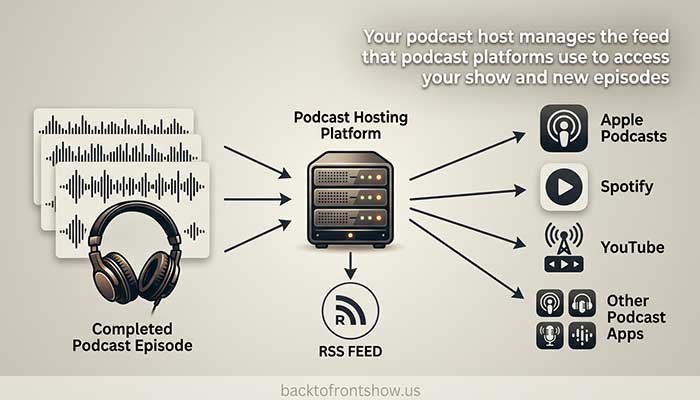
If your show is hosted with Spotify for Creators, Spotify says it is automatically published on Spotify.
If you host your podcast somewhere else, you can submit or claim the show using its RSS feed through Spotify for Creators.
Spotify may use the email address in your RSS feed to verify ownership.
If you use Spotify as your host and want to reach platforms beyond Spotify, you still need to submit the podcast to those services.
Spotify explicitly notes that it does not automatically submit Spotify-hosted shows to every third-party podcast platform.
That’s an important detail because “podcast distribution” can sound more automatic than it really is.
Read More: How to Publish a Podcast: A Step-by-Step Guide
Step 16: Consider Publishing Your Podcast on YouTube
YouTube is another channel worth considering, particularly if your show has a video component.
YouTube currently treats a podcast as a playlist, with full-length podcast episodes represented as videos inside that playlist.
In YouTube Studio, creators can create a new podcast, provide its title and description, add square artwork, and upload episodes.
YouTube also supports RSS ingestion for eligible creators in supported countries and regions.
One important distinction: YouTube says you can’t simply turn an MP3 into a standard YouTube podcast episode through the normal upload workflow—episodes in a YouTube podcast playlist are represented as videos.
Current instructions: YouTube Help: Create a podcast in YouTube Studio
Step 17: Plan Your Podcast Launch
Publishing an episode is not the same thing as launching effectively.
Before launch day, try to have:
- Finished podcast artwork
- Complete show description
- Trailer, if useful
- At least one finished episode
- Additional episodes already planned or recorded
- Podcast directory accounts ready
- Social profiles or other promotional channels prepared
Should You Launch With Multiple Episodes?
There is no rule requiring it.
However, publishing more than one useful episode can give a new listener something else to hear immediately if they enjoy the first one.
For example, you could launch with:
- A short trailer
- Episode 1
- Episode 2
Then continue on your normal schedule.
Don’t delay your launch for months just because someone told you that you must have a certain number of episodes.
Step 18: Promote Your Podcast
A podcast doesn’t automatically find an audience just because it exists in Apple Podcasts or Spotify.
You have to create reasons for people to discover it.
Promote Each Episode Individually
Instead of repeatedly posting:
“Listen to my podcast.”
give people a specific reason to care.
For example:
“Why do some small businesses get website traffic but almost no leads? This week’s episode breaks down four common reasons.”
That communicates value before asking for attention.
Repurpose Your Episodes
One episode can produce:
- Short video clips
- Social media posts
- Quotes
- Email newsletter content
- Blog content
- YouTube videos
- Short educational posts
You don’t need to use every channel.
Focus on the places your target listener already spends time.
Make Episodes Search-Friendly
Use clear language in:
- Podcast title
- Episode title
- Description
- Show notes
If an episode explains how to start an email newsletter, a descriptive title will generally communicate more to both people and search systems than something vague such as “Let’s Talk Growth.”
Step 19: Review Your Podcast Analytics
Once people begin listening, your analytics can help you understand what is happening.
Depending on your host and distribution platforms, you may be able to review metrics related to:
- Plays or downloads
- Audience location
- Listening platforms
- Individual episode performance
- Retention
- Followers
- Discovery
Don’t obsess over your numbers after the first episode.
Early data can be noisy because the audience is small.
Instead, look for patterns as you publish more episodes.
For example, if several episodes about one subject repeatedly attract stronger interest than unrelated topics, that can help you decide what to create next.
The goal isn’t simply to collect statistics. It’s to make better content decisions.
How Much Does It Cost To Start a Podcast?
It depends entirely on your setup.
A basic podcast can be started very cheaply if you already have a computer or smartphone.
Your potential costs can include:
| Expense | Is It Required? |
|---|---|
| Computer or smartphone | Yes, in most workflows |
| External microphone | Recommended, not always essential |
| Headphones | Strongly recommended |
| Audio interface | Only for certain microphones/setups |
| Recording software | Free options available |
| Editing software | Free options available |
| Podcast hosting | Free and paid options available |
| Cover art | Can be DIY or outsourced |
| Remote recording service | Optional |
| Music or sound effects | Optional |
| Website | Optional |
I wouldn’t recommend buying an expensive setup before you’ve proven that you actually enjoy making episodes.
Start with equipment that is good enough to produce understandable, pleasant audio. Upgrade when you can identify a specific limitation that new equipment will solve.
Read More: How to Edit a Podcast: A Beginner-Friendly Workflow
Common Beginner Podcasting Mistakes
Buying Too Much Equipment
A microphone collection won’t fix an unclear podcast idea.
Start simple.
Choosing a Topic That’s Too Broad
If your podcast is “about everything,” new listeners may struggle to understand why they should follow it.
Recording in a Bad Room
Echo and background noise can make even an expensive microphone sound poor.
Skipping the Test Recording
A 30-second test can catch the wrong microphone selection, clipping, noise, or recording failure.
Trying to Sound Perfect
People generally don’t expect every podcast conversation to sound like a scripted television production.
Focus on clarity and usefulness.
Publishing Without a Content Plan
Before launching, know what you’re going to make next.
Ignoring Episode Titles
Good titles help potential listeners understand the value of individual episodes.
Assuming Hosting Equals Distribution Everywhere
Your host provides an RSS feed and may simplify distribution, but you may still need to submit or claim the podcast on individual platforms.
Spotify, for example, currently requires Spotify-hosted creators to submit their show separately to platforms such as Apple Podcasts.
Quitting Too Early
The first few episodes are partly a learning process.
Your recording technique, editing, delivery, interview skills, and episode structure will usually improve with practice.
A Simple Podcast Setup for Beginners
If all of this feels complicated, simplify it.
A beginner audio setup can look like:
Microphone: USB microphone
Headphones: Any comfortable closed-back headphones you already own
Computer: Existing laptop or desktop
Recording/editing: Audacity or similar software
Room: Quiet bedroom, office, or other soft-furnished space
Hosting: Reputable podcast host with RSS distribution
Artwork: Simple square design with readable show title
That’s enough to create a real podcast.
You can improve the setup later.
Beginner Podcast Launch Checklist
Before publishing, make sure you can check these boxes:
- I know who my podcast is for.
- My show has a clear topic.
- I have at least 15 future episode ideas.
- I’ve chosen a realistic publishing schedule.
- My microphone works correctly.
- My recording room is reasonably quiet.
- I’ve made a test recording.
- My first episode has been edited and reviewed.
- My podcast name is finalized.
- My cover art is complete.
- My podcast description is written.
- I’ve selected a podcast hosting platform.
- My RSS feed works.
- My podcast has been submitted to the platforms I want to reach.
- I know what my next episode will be.
- I have a simple promotion plan.
What Should You Do Next?
If you’ve been researching how to create a podcast but haven’t started because the technical side seems overwhelming, simplify your first version.
Pick your audience.
Define your topic.
Plan your first few episodes.
Record in the quietest room available.
Use equipment you can realistically afford.
Edit the episode until it’s clear and pleasant to listen to—not until it’s perfect.
Then publish it.
From my experience, the most useful upgrade for a beginner is often not another piece of equipment. It’s what you learn from actually producing the first few episodes.
Your tenth episode will probably be better than your first.
You won’t reach episode ten until you make episode one.