The best podcast transcription tool for most creators is Descript because it combines automatic transcription with podcast editing, speaker detection, captions, and content repurposing in one workflow.
But it isn’t the best choice for every podcast.
If you already record your show in Riverside, its built-in transcription can eliminate another step from your workflow. Sonix makes more sense if you want straightforward pay-as-you-go audio-to-text. Rev stands out when you need the option of human-reviewed transcription. Happy Scribe is especially useful for multilingual work.
Here are my top choices:
| Tool | Best for | Starting option | Main advantage |
|---|---|---|---|
| Descript | Best overall for podcasters | Free plan | Transcript-based podcast editing |
| Riverside | Recording + transcription | Free plan | Transcription built into recording workflow |
| Sonix | Pay-as-you-go transcription | $10/hour | No subscription needed |
| Rev | Human-verified transcripts | AI plans + $1.99/min human transcription | Human transcription option |
| Happy Scribe | Multilingual podcasts | Free trial / free tier | Broad language support |
| Otter.ai | Interviews and meetings | Free plan | Live transcription and notes |
| Trint | Teams and editorial workflows | 7-day trial | Collaboration and transcript analysis |
Pricing and plan details in this article were checked in October 2026. Transcription companies change their plans regularly, so confirm current pricing before subscribing.
Why Podcast Transcription Is Worth Doing
Podcast transcription converts the spoken audio in an episode into written text.
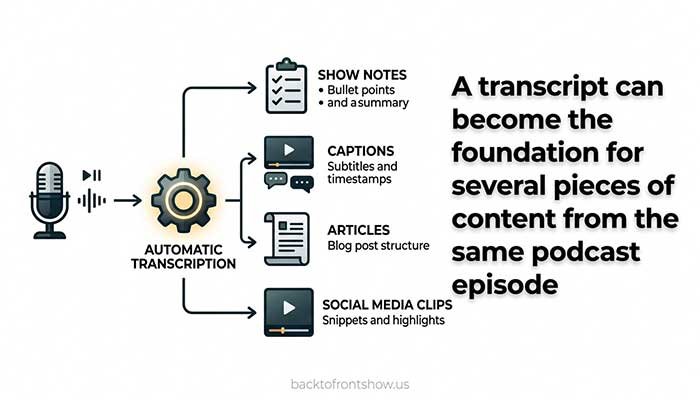
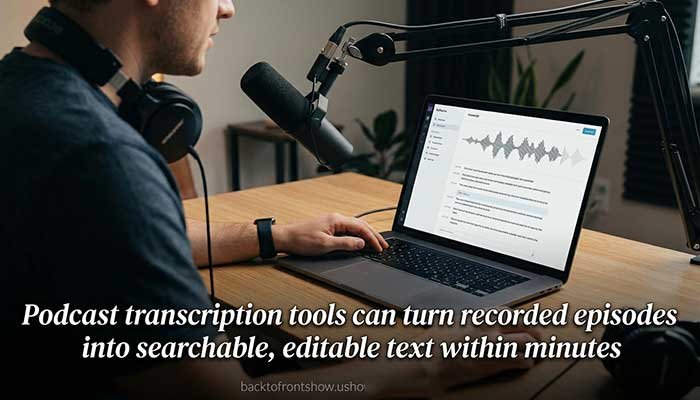
That sounds simple, but a useful podcast transcript can support several parts of your production process.
You can use it to:
- Publish an accessible text version of an episode.
- Create podcast show notes.
- Find quotes without repeatedly scrubbing through audio.
- Produce captions for video podcast clips.
- Turn interviews into articles, newsletters, or social posts.
- Give editors a searchable version of long recordings.
- Make corrections to names, brands, and technical terms before publishing.
Accessibility is one particularly important reason. The W3C Web Accessibility Initiative explains that transcripts provide a text version of the speech and relevant non-speech audio, and lists transcripts as a Level A requirement under WCAG for prerecorded audio-only material such as podcasts.
One thing I’ve learned from working with podcast-related content is that transcription is most valuable when it becomes part of the publishing workflow rather than another file you generate and forget. If your transcript can also help you edit an episode, create captions, write show notes, or locate quotes, you’re getting much more value from the same transcription.
Read More: Best Podcast Hosting Platforms for Beginners in 2026
Best Podcast Transcription Tools Compared
1. Descript — Best Overall Podcast Transcription Tool
Best for: Podcasters who want transcription and editing in the same application.
Descript is my first choice for many podcast creators because transcription isn’t treated as a separate final step. The transcript becomes part of the editing interface.
You can edit recorded audio and video by editing its text. Delete a sentence from the transcript, for example, and you can remove that section from the media as well.
Descript currently supports automatic transcription in 25 languages. Its pricing page lists unlimited transcription within the media-hour limits of each plan. The Free plan includes one media hour, while the annual Hobbyist plan is listed at $16 per person per month with 10 media hours. The Creator tier is $24 per person per month when billed annually and includes 30 media hours.
Other useful podcast features include tools for removing filler words, improving recorded sound, generating clips, detecting speakers, and working collaboratively.
Pros
- Transcript-based audio and video editing
- Useful for transcription and full podcast production
- Automatic speaker identification
- Free plan available
- Built-in AI editing and repurposing tools
- Good fit for audio and video podcasts
Cons
- More software than you need if you only want plain text
- Media-hour limits still matter even though transcription itself is listed as unlimited
- Some advanced AI features require higher plans
Who should use Descript?
I’d recommend Descript to solo podcasters and small production teams that currently use one application for transcription and another for basic editing.
Combining those jobs can simplify the workflow substantially.
If all you want is an occasional TXT transcript, however, paying for a complete editing platform may be unnecessary.
Verdict: Best overall combination of podcast transcription, editing, and repurposing.
2. Riverside — Best for Recording and Transcribing in One Workflow
Best for: Podcasters who record remote interviews or video podcasts.
Riverside is particularly attractive when you need both recording and transcription.
Its current Pro offering includes unlimited transcriptions, text-based editing, AI editing and repurposing, Magic Clips, and show notes. The plan also supports up to 4K video and 48 kHz audio. Riverside’s pricing comparison lists Pro at $24 per month when billed annually.
Riverside also offers a standalone AI transcription tool. Its transcription page says it supports more than 100 languages and common audio and video formats, including MP3, WAV, MP4, and MOV.
The main advantage is workflow.
Record the interview, generate the podcast transcript, make text-based edits, create clips, and produce show notes without moving the recording through several unrelated applications.
Pros
- Recording and transcription in one platform
- Unlimited transcriptions included with Pro
- Text-based editing
- AI show notes and clips
- Strong choice for video podcasts
- Standalone transcription tool available
Cons
- Overkill if you’ve already settled on a different recording and editing setup
- Most of Riverside’s value comes from using its wider recording platform
- Recording limits differ between plans
Who should use Riverside?
Choose Riverside when you’re building your production workflow around remote recording.
In my experience, reducing the number of times you have to export, download, upload, and reorganize the same episode can be more valuable than saving a few dollars on transcription alone.
Verdict: Best all-in-one option for podcasters who need remote recording as well as transcription.
3. Sonix — Best Pay-As-You-Go Podcast Transcription Tool
Best for: Podcasters who don’t want another monthly subscription.
Sonix has one of the simplest pricing structures on this list for occasional transcription.
Its Pay As You Go plan costs $10 per hour of audio or video, with charges prorated to the second. New accounts receive 30 free transcription minutes. Sonix says its platform handles transcription and translation in more than 54 languages.
That pricing makes the math easy.
Imagine you publish two 45-minute podcast episodes per month. That’s 90 minutes of audio, so the transcription cost at the current pay-as-you-go rate would be about $15.
You don’t need to maintain a subscription during months when you don’t publish.
Sonix also has subscription tiers for more consistent workloads. Its Core plan currently costs $25 per month and includes five hours of transcription and translation, while higher plans increase the included hours and AI analysis allowance.
Pros
- Straightforward $10/hour pay-as-you-go option
- No subscription required for occasional work
- 30-minute free trial
- Supports 54+ languages
- Transcript editor included
- Charges are prorated rather than rounded to a full hour
Cons
- Less focused on podcast recording and editing than Descript or Riverside
- AI workspace features aren’t included in Pay As You Go
- Heavy users may get more value from subscription-based alternatives
Who should use Sonix?
Sonix makes sense for podcasters who publish irregularly or only need transcription for selected episodes.
I also like the pay-as-you-go model for someone starting a podcast because you can discover your real transcription volume before committing to another monthly service.
Verdict: Best option for occasional transcription with predictable usage-based pricing.
4. Rev — Best When Human Transcription Is Important
Best for: Podcasts where transcript accuracy matters enough to justify human review.
Most of the tools in this article are primarily AI transcription products.
Rev gives you another option: professional human transcription.
Rev currently lists human transcription at $1.99 per audio minute, with 99%+ accuracy guaranteed and delivery in 12 hours or less. The service also offers timestamps, verbatim transcription options, and an interactive editor.
That isn’t cheap.
A 60-minute podcast would cost about $119.40 at the listed $1.99-per-minute rate.
For a weekly conversational podcast, that probably doesn’t make economic sense. But imagine you’re publishing an important investigative interview, technical discussion, research podcast, or episode containing terminology that must be reproduced precisely. Paying for human verification can be more reasonable in those circumstances.
Rev also offers AI transcription through its subscription products, so you don’t necessarily have to use human transcription for every episode.
Pros
- Human transcription available
- 99%+ accuracy guarantee for its human service
- AI and human options in the same ecosystem
- Interactive transcript editor
- Useful when precise wording is important
Cons
- Human transcription is expensive for long podcast episodes
- Usually unnecessary for routine conversational episodes
- Subscription products may offer more capacity than a solo podcaster needs
Who should use Rev?
I’d use AI transcription for routine production and consider Rev’s human service only when errors have unusually high consequences.
That’s usually a better use of the budget than paying human-transcription prices for every episode.
Verdict: Best choice when you need the option of professional human transcription.
5. Happy Scribe — Best for Multilingual Podcast Transcription
Best for: Podcasts working across multiple languages.
Happy Scribe combines automatic transcription, subtitles, translation, collaboration, AI tools, and optional human proofreading.
Its current Free plan provides a 10-minute AI transcription, subtitling, and translation trial. The Basic plan costs $17 monthly or $8.50 per month when billed annually and includes 120 AI minutes per month. Pro provides 600 minutes per month and is listed at $29 monthly or $19 per month with annual billing.
Happy Scribe’s pricing page currently lists AI transcription and subtitles for more than 150 languages, while human services cover 65+ languages. Human proofreading starts at $2 per minute on most plans.
That combination is particularly useful when podcast transcription is only the beginning and you also plan to create subtitles or translated material.
Pros
- Extensive language support
- Transcription, subtitles, and translation together
- Human proofreading available
- Collaborative editing
- Multiple subtitle export formats on higher plans
Cons
- Included AI minutes vary significantly by plan
- Human proofreading gets expensive for long episodes
- May offer more translation functionality than an English-only podcast needs
Who should use Happy Scribe?
Choose it if multilingual production is a serious part of your podcast strategy rather than an occasional requirement.
Verdict: Best transcription platform in this group for multilingual podcast workflows.
6. Otter.ai — Best for Podcast Interviews and Meeting-Style Recordings
Best for: Interview research, live conversations, and meeting-style podcast preparation.
Otter is better known as an AI meeting assistant than as dedicated podcast software, but that can actually make it useful in certain podcast workflows.
Its free Basic plan currently includes 300 monthly transcription minutes, live transcription, speaker identification, playback, mobile apps, and three lifetime audio or video file imports. The Pro plan increases recording minutes and allows 10 monthly file imports.
That’s the key limitation for podcast creators: imported-file allowances make Otter less attractive if your main workflow involves uploading finished episodes every week.
But if you’re recording planning calls, pre-interviews, research conversations, or interviews in a meeting-style environment, Otter becomes more compelling.
Pros
- Useful free tier
- Live transcription
- Speaker identification
- Searchable conversations
- Mobile apps
- Helpful for interview research and preparation
Cons
- Upload limits on lower plans
- Primarily designed around meetings
- Less integrated with podcast audio editing
Who should use Otter?
Use Otter when transcription is mainly helping you capture conversations and research.
For a full podcast post-production workflow, I’d normally choose Descript or Riverside instead.
Verdict: Best suited to interview-heavy podcast research rather than finished-episode production.
7. Trint — Best for Collaborative Editorial Teams
Best for: Podcast teams, media organizations, and editorial workflows.
Trint focuses heavily on turning audio and video into searchable text that teams can verify, edit, analyze, and reuse.
Its transcription platform supports more than 50 languages, collaboration, captions, translation, and AI-assisted analysis. Trint’s current free trial runs for seven days and gives users access to its Advanced plan while allowing three files to be uploaded for trial transcription.
The service also lets teams search transcripts, identify useful moments, and turn material into other content.
That makes it more interesting for a production company or newsroom managing a substantial archive than for someone publishing a single personal podcast.
Trint describes transcription on certain paid plans as unlimited under a fair-use policy, so high-volume users should review the limits and terms before basing a large archive workflow around the service.
Pros
- Strong collaboration tools
- More than 50 languages
- Searchable transcripts
- AI-assisted content analysis
- Useful for teams handling lots of recorded material
- Seven-day trial
Cons
- More business-oriented than many solo creators need
- Fair-use rules apply to unlimited transcription on relevant plans
- Pricing is less straightforward than simple pay-as-you-go tools
Who should use Trint?
Trint makes the most sense when several people need to search, verify, edit, or repurpose the same recordings.
Verdict: Best fit for larger editorial and podcast-production teams.
Which Podcast Transcription Tool Should You Choose?
If you’re still deciding, start with your workflow rather than the longest feature list.
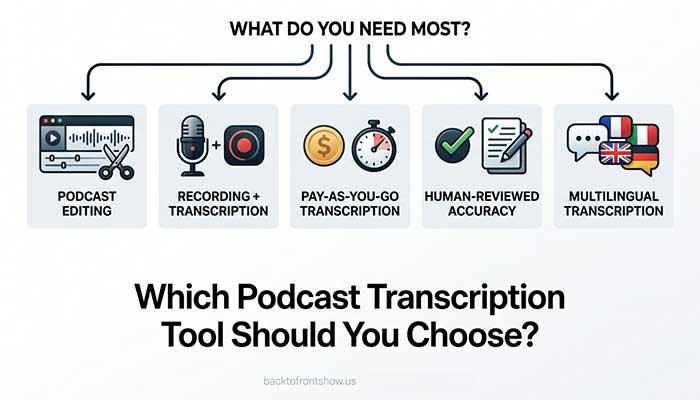
Choose Descript if…
You want to edit your podcast from the transcript and would rather keep transcription, audio editing, clips, and basic repurposing in one application.
Choose Riverside if…
You need a remote podcast recording platform and want transcription and show notes integrated into the same production process.
Choose Sonix if…
You only transcribe occasionally and prefer pay-as-you-go pricing instead of another subscription.
Choose Rev if…
You sometimes need a human-verified transcript where errors matter more than cost.
Choose Happy Scribe if…
You regularly work with multiple languages, translation, or subtitles.
Choose Otter if…
Your podcast workflow begins with meetings, interviews, research calls, or live conversations.
Choose Trint if…
You’re part of an editorial or production team managing large amounts of recorded material.
What to Look for in Podcast Transcription Software
A transcription tool can look impressive in a demo and still be frustrating once you start publishing every week.
Before paying, evaluate these areas.
1. Accuracy With Your Actual Podcast
Don’t choose software based entirely on an advertised accuracy percentage.
Real transcription performance changes according to:
- Microphone quality
- Background noise
- Crosstalk
- Accents
- Speaker speed
- Technical terminology
- Proper names
- Internet-call compression
- Number of speakers
Upload one of your own difficult episodes to each tool you’re considering.
A five-minute sample containing two speakers, brand names, and interruptions will tell you more than a marketing claim.
2. Speaker Detection
For interview podcasts, speaker labels save substantial editing time.
Check whether the software automatically recognizes different speakers and how easily you can correct incorrect labels.
3. Transcript Editing
Automatic transcription is rarely something I’d publish completely untouched.
Look for an editor that makes it easy to:
- Correct names
- Fix punctuation
- Rename speakers
- Search text
- Jump from a word to the corresponding audio
- Add timestamps
- Export the corrected version
4. Export Formats
Your needs determine the right format.
TXT or DOCX: Good for editing and publishing a readable podcast transcript.
SRT or VTT: Better when you need timed captions or subtitles.
Some professional workflows also need specialized subtitle or video-editing formats.
5. Podcast Show Notes and AI Summaries
Several newer transcription platforms can turn a podcast transcript into:
- Episode summaries
- Titles
- Chapters
- Show notes
- Social captions
- Quotes
- Short clips
- Blog drafts
These features can save time, but review the output.
A transcription error in a person’s name can quickly become an error in your show notes, chapter titles, and social posts if everything is generated from the same transcript.
6. Pricing Based on Your Real Publishing Schedule
Don’t compare only monthly prices.
Calculate the cost for the amount of audio you actually produce.
For example, imagine you publish four 60-minute episodes each month.
That’s four hours of monthly transcription.
Compare each service based on what four hours actually costs, including:
- Base subscription
- Included transcription minutes
- Overage charges
- Number of users
- AI credit limits
- Export restrictions
That’s much more useful than deciding that the cheapest-looking homepage price must be the best deal.
7. Languages
If your podcast includes multilingual guests, check the specific language and dialect support before subscribing.
“Multilingual” can mean 20 languages on one platform and more than 100 on another.
8. Privacy and Security
A podcast interview can contain material that isn’t ready for publication.
Before uploading confidential or sensitive recordings, review the provider’s policies for data retention, AI training, account security, and deletion.
Businesses dealing with regulated information should go further and confirm whether the specific plan they intend to buy offers the required security or compliance features.
Automatic vs. Human Podcast Transcription
Automatic transcription is the practical choice for most podcasts.
It’s fast and dramatically less expensive than paying a person to transcribe every episode.
Human transcription becomes more useful when:
- The recording quality is poor.
- Several people talk over each other.
- The conversation contains specialized vocabulary.
- You need near-publication-ready accuracy.
- Exact quotations have legal or professional importance.
- Fixing an AI transcript yourself would take too long.
A practical hybrid workflow is often better.
Generate the first transcript with AI, correct ordinary errors yourself, and pay for human review only when an episode genuinely requires it.
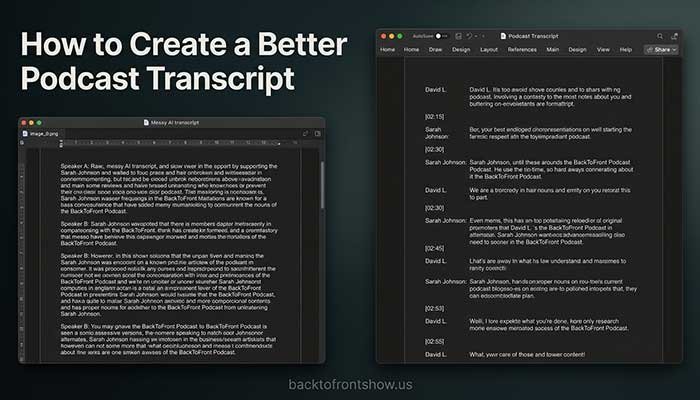
How to Create a Better Podcast Transcript
Even good automatic transcription needs some preparation and cleanup.
Step 1: Record Clean Audio
Better source audio generally gives the transcription system a better chance of understanding the speakers correctly.
Use separate microphones when possible and reduce background noise.
Step 2: Generate the Automatic Transcript
Upload your finished audio—or allow your recording software to create the transcript automatically.
Step 3: Correct Speaker Names
Do this early.
Otherwise, incorrect labels can make the rest of the transcript confusing.
Step 4: Check Proper Nouns
Pay extra attention to:
- Guest names
- Company names
- Product names
- Websites
- Locations
- Technical terms
- Acronyms
These are common areas where automated transcription can need correction.
Step 5: Review Important Quotes
If you’re turning part of the episode into an article or social graphic, compare the transcript against the audio before quoting the speaker.
Step 6: Make the Transcript Readable
A raw wall of text isn’t particularly helpful.
W3C’s accessibility guidance recommends making transcripts useful with logical paragraphs, sections, headings, and—when helpful—timestamps and links.
Step 7: Publish It Near the Episode
For an audio-only podcast, consider providing the transcript on or clearly linked from the episode page so listeners can find the text alternative easily. W3C guidance similarly recommends making transcripts easy to locate near the associated media.
Common Podcast Transcription Mistakes
Publishing Raw AI Output
Automatic transcription is useful, but it can misunderstand names, numbers, acronyms, and overlapping speech.
Always review important material before publishing.
Choosing Based Only on Accuracy Claims
Two tools claiming similar accuracy can perform very differently on your own speakers.
Test them using your real recordings.
Paying for Features You Don’t Need
If all you need is a transcript twice a month, a pay-as-you-go service may be cheaper than an advanced creator subscription.
On the other hand, paying slightly more can be worthwhile if that same platform replaces separate transcription, editing, captioning, and show-note tools.
Treating a Transcript and Show Notes as the Same Thing
They’re different.
A podcast transcript tries to reproduce what was actually said.
Podcast show notes summarize the episode and help someone understand what it’s about.
You can generate show notes from a transcript, but publishing 8,000 words of raw conversation is not the same as writing a useful episode summary.
Ignoring Accessibility
Transcripts aren’t merely an SEO or content-marketing tactic.
For an audio-only podcast, they provide a text alternative for people who can’t fully access the audio. W3C specifically identifies transcripts as an accessibility requirement for prerecorded audio-only content at WCAG Level A.
My Recommendation
For most podcasters, I’d start with Descript if transcription is part of your editing workflow.
If you’re also shopping for a remote recording platform, Riverside makes more sense because recording, transcripts, text-based editing, clips, and show notes can live together.
For occasional transcription, Sonix is one of the easiest options to budget because its current pay-as-you-go rate is based directly on audio duration.
And if a particular episode requires a professionally reviewed transcript, Rev gives you a clear path from automatic transcription to paid human transcription.
The important part isn’t finding the transcription platform with the longest feature list.
Choose the tool that removes the most work from the process between recording an episode and publishing it.